Record the visit, choose managed evidence, pin document versions and control the next hand-over selection.
Product location: /qms/audits. Select External → View details for the intended audit → Evidence Room. The tab and selected record are not encoded in this URL.
Use Quality (QMS) → Audit & Inspection → External to record an outside organisation's audit and select the evidence you intend to provide. Manage Audits access is required to view these records, curate evidence and generate packages. The evidence room is an administrator's selection of managed documents for one external audit.
Before creating the record, agree the auditing organisation, purpose, planned dates and evidence boundaries. Upload and review the source documents in Documents first. The evidence picker selects existing vault documents; it does not upload a file, create a document or complete its approval workflow.
Creating an external audit, typing an auditor's name and staging a document do not invite the auditor, create a portal account or send the material to that person. Plan the actual hand-over separately.
Product location: /qms/audits. Select External → View details for the intended audit → Evidence Room. The tab and selected record are not encoded in this URL.
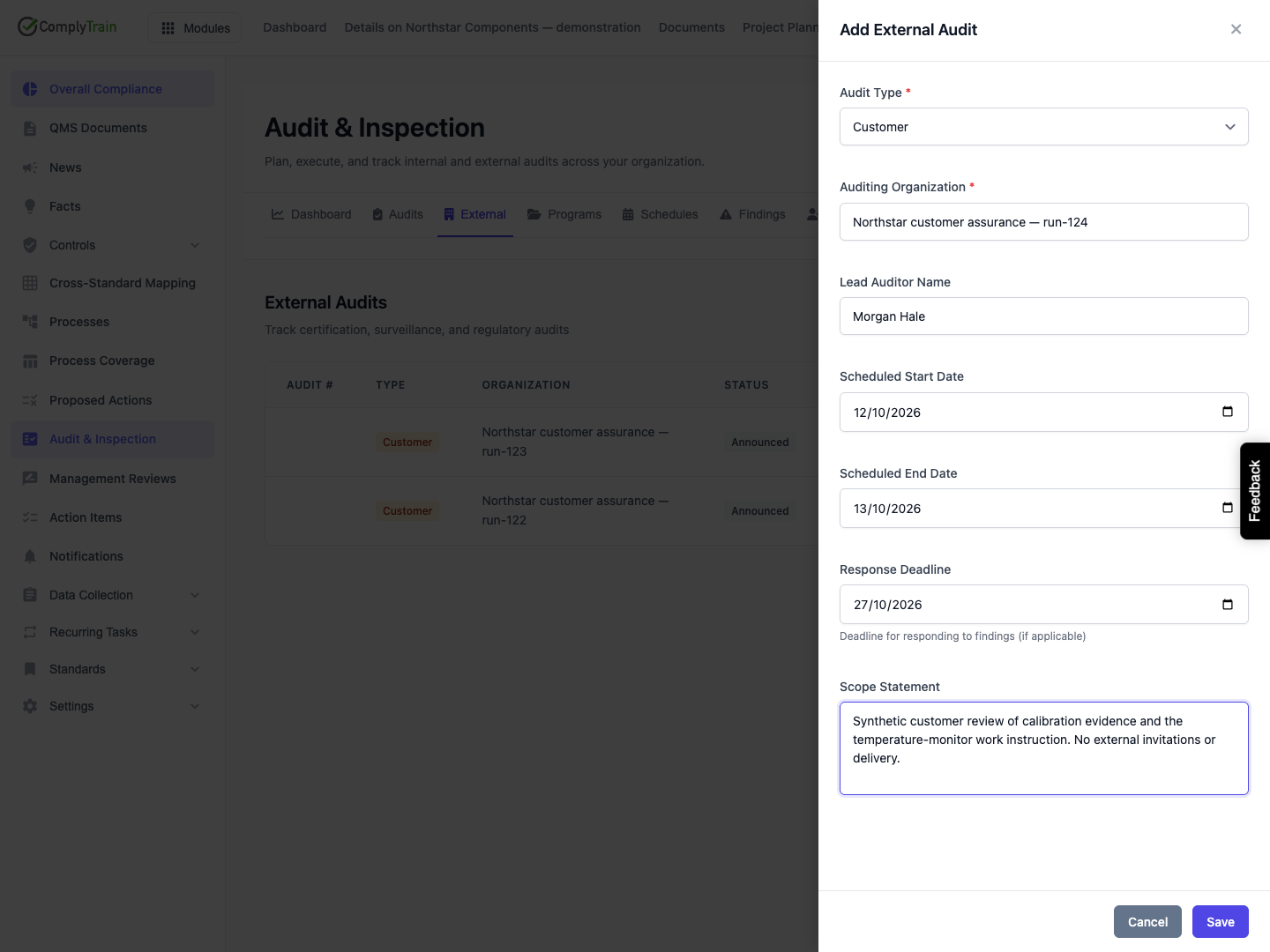
Select Add External Audit and complete the panel.
Field | Meaning and entry rules |
|---|---|
Audit Type | Required. Certification is the default. Surveillance, Recertification, Customer and Regulatory are also available. Choose the type of visit; it does not select a standard or apply a separate evidence checklist. |
Auditing Organization | Required name of the visiting organisation, up to 200 characters. Use a meaningful name rather than an internal engagement title. |
Lead Auditor Name | Optional name, up to 200 characters. This is descriptive text, not a selected user account or invitation. |
Scheduled Start Date | Optional planned first day. |
Scheduled End Date | Optional planned final day. When both dates exist, end cannot precede start. Equal dates are allowed for a one-day visit. |
Response Deadline | Optional date by which responses to findings are expected. Check its relationship to the visit yourself; this form does not enforce that it follows the end date. |
Scope Statement | Optional description of what will be examined, including boundaries and relevant context. Mentioning a standard or site in this text does not establish a structured association. |
There are no email, team, standard-selection, site, department or audit-number fields in the released creation panel. Select Save, then find the organisation in the list and choose its View details action. Cancel, closing the panel or selecting its backdrop abandons unsaved entries.
Product location: /qms/audits. Select External → View details for the intended audit → Evidence Room. The tab and selected record are not encoded in this URL.
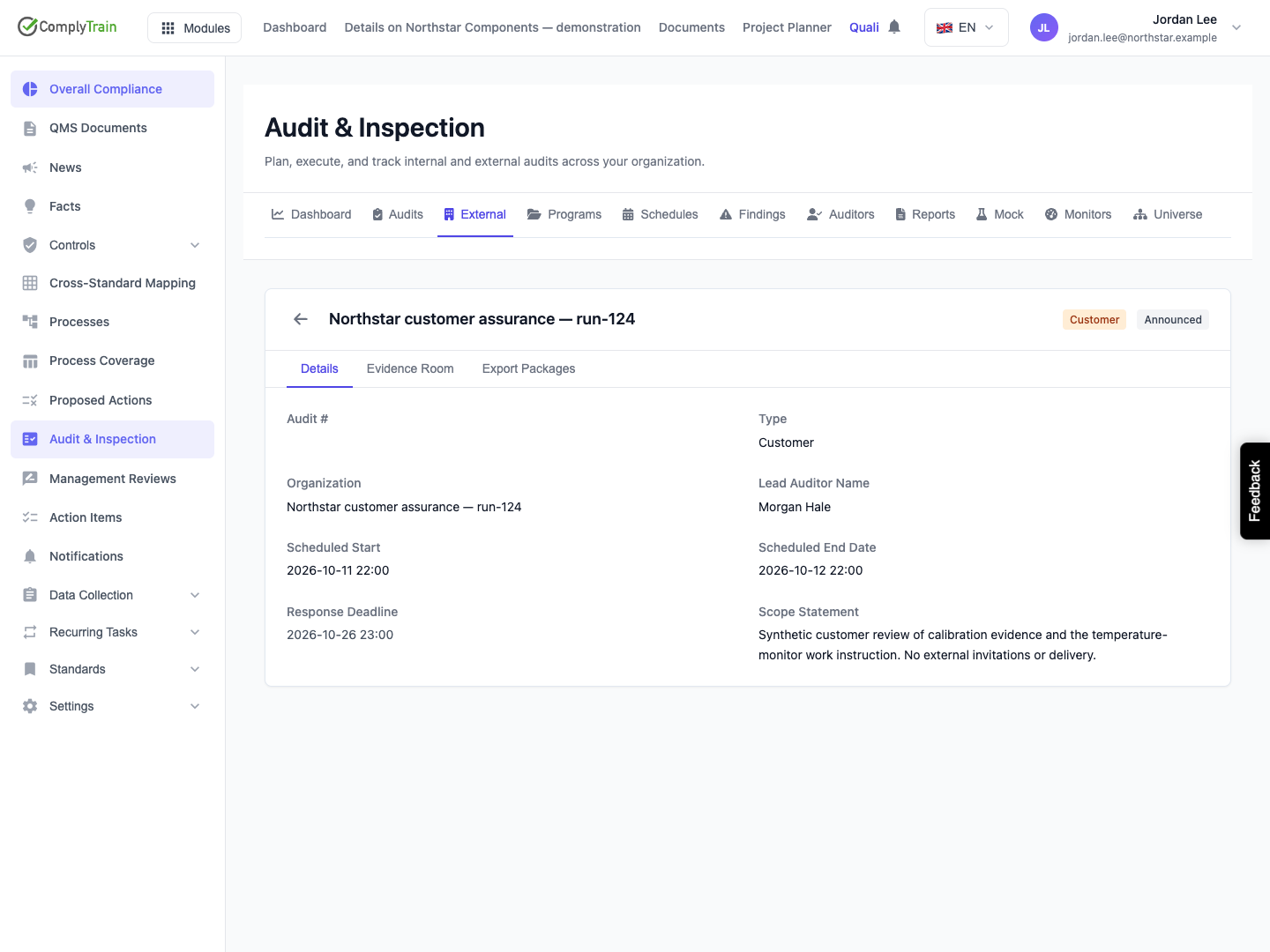
A new record has Announced status. This creation panel does not supply or generate an audit number, so the number can remain blank; identify the example by its organisation and dates. The list shows the organisation, type, status, scheduled start and response deadline. Open the record to inspect its saved scope and dates before choosing Evidence Room or Export Packages.
Check the date interpretation carefully. In the illustrated release, a 12 October start entered as a calendar date returns as 2026-10-11T22:00:00.000Z and displays as 2026-10-11 22:00. The end and response dates also appear as previous-day timestamps. The generated summary repeats those returned timestamps. Resolve this discrepancy with your administrator before using the displayed dates to coordinate an actual visit; do not compensate by guessing a different input date.
A response deadline earlier than the current moment is highlighted as overdue. The highlight compares the date with the current time; it is not evidence that a finding remains unanswered, and it is not conditioned on the audit's lifecycle state. A date-only deadline can therefore turn red during its stated day.
In this release, the external-audit detail is read-only. It does not offer editing or deletion of the audit record, lifecycle-transition controls, a team editor, external finding entry or a response-submission form. Available status names do not imply that those transitions can be performed on this screen. If the saved visit details need correction, ask your administrator for the supported correction process rather than creating competing records without explanation.
Product location: /qms/audits. Select External → View details for the intended audit → Evidence Room. The tab and selected record are not encoded in this URL.
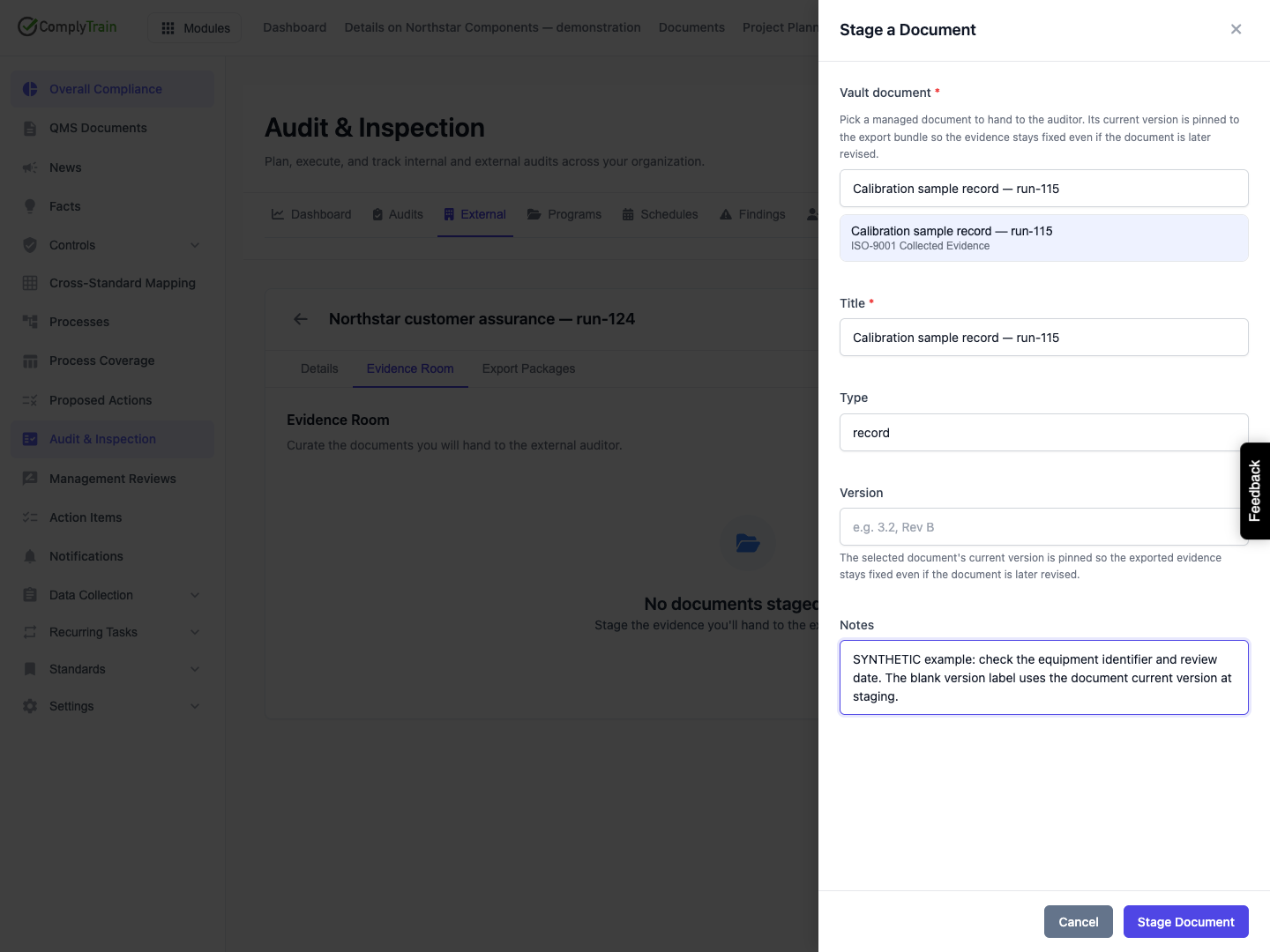
Open Evidence Room → Stage Document. Search by document name and select the intended entry. Check the vault name below it, particularly when several vaults contain similarly named documents.
The chooser searches names without case sensitivity and shows up to 50 matching documents in name order. Narrow the search to find an item beyond that first set; there is no next-page control. It searches across active vaults and requires a recorded current document version. It is not restricted to the standard named in the audit's scope, and it does not filter to approved documents. Confirm the source's workflow state and suitability in Documents yourself.
Choosing an item copies its name into Title. Merely seeing a document in the chooser does not prove its stored file will be readable when a package is generated; generation checks the actual source bytes.
Product location: /qms/audits. Select External → View details for the intended audit → Evidence Room. The tab and selected record are not encoded in this URL.
Field | Meaning and entry rules |
|---|---|
Vault document | Required selection of an existing managed document. Typing a search term alone does not select it. |
Title | Required label for this evidence-room entry, up to 500 characters. It initially uses the selected document's name; changing it does not rename the underlying document. |
Type | Optional descriptive category, up to 100 characters, such as |
Version | Optional version label, up to 50 characters. Use an exact existing version label only when deliberately selecting that revision; see the version rules below. |
Notes | Optional context or instructions. These notes are saved with the staged entry; do not assume they appear as annotations inside the source file or in every export view. |
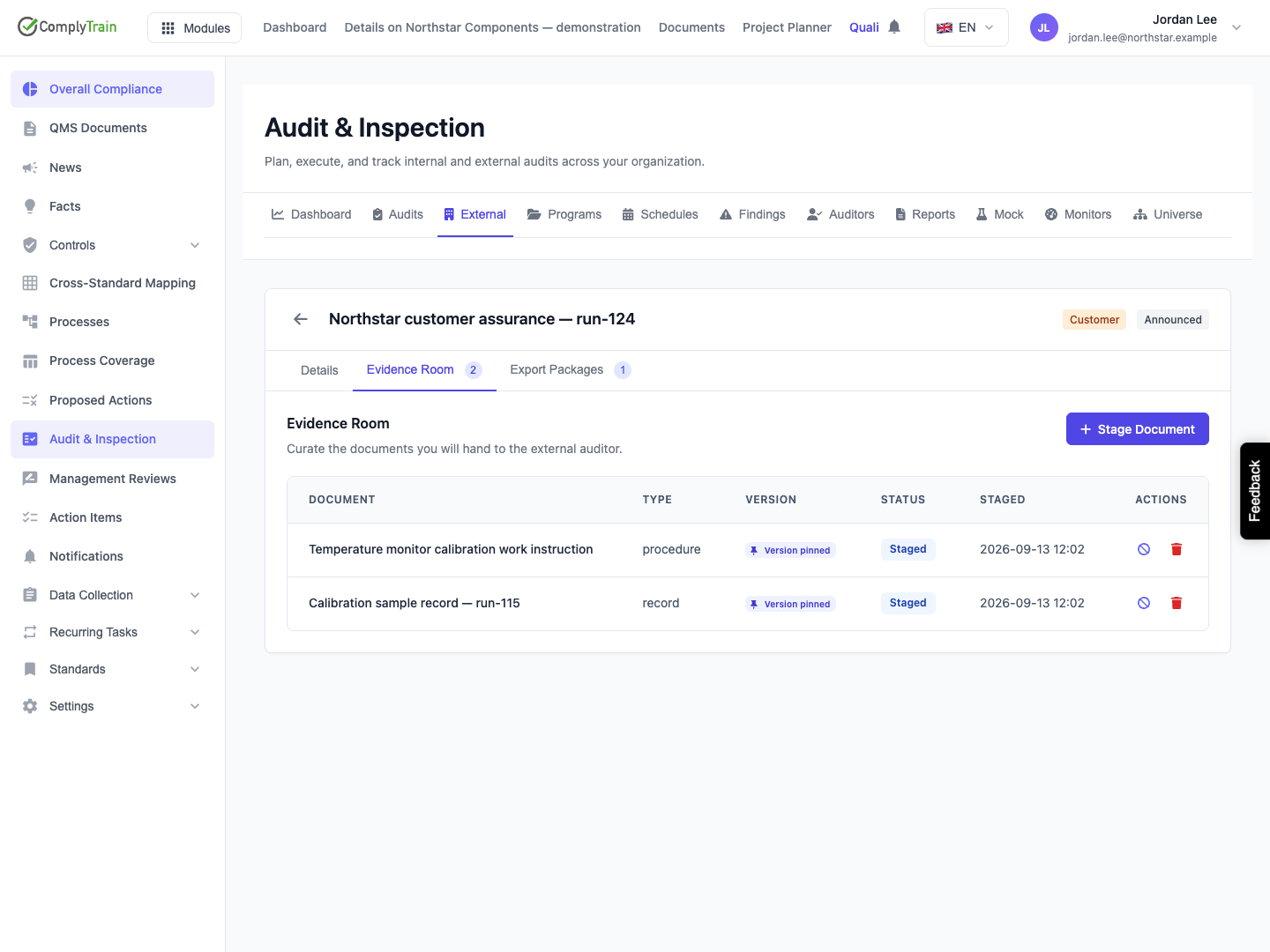
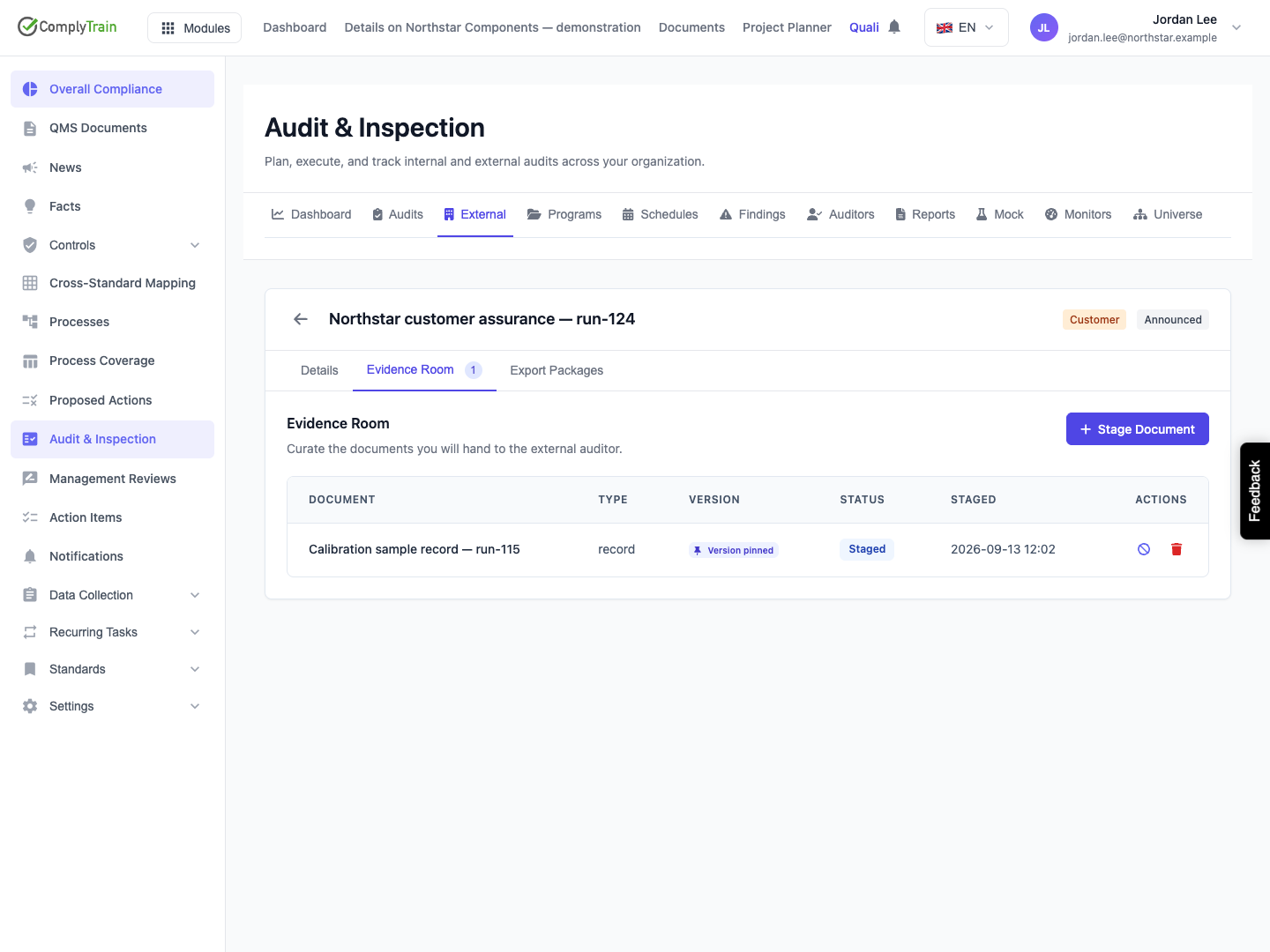
Select Stage Document, reopen the record and check the saved row's title, type, version indication, status and staged date. The initial status is Staged. There is no subsequent editor for its title, type, version or notes in this screen. To replace an incorrect selection, withdraw or remove the entry and stage the intended source again.
Product location: /qms/audits. Select External → View details for the intended audit → Evidence Room. The tab and selected record are not encoded in this URL.
With Version blank, staging normally pins the document's current version at that moment. A Version pinned badge indicates that a concrete version was retained. Later edits to the source document do not update that pin or already generated packages.
The optional Version field is not a guaranteed selector. If its text exactly matches a version belonging to the chosen document, that version is pinned. If it does not match, the released service falls back to the current version without rejecting the label. A plausible typed label is therefore not proof that the named historical revision was selected. Check the document's actual revision and inspect the package manifest before relying on it.
An entry without a retained version pin can resolve the current version when generation runs. A Current label has a different meaning from Version pinned: it is not a promise that future exports contain the same bytes. Conversely, if a pinned version becomes unavailable, generation fails rather than silently replacing it with the current revision.
The export-package guide explains how the manifest records the source document, resolved version and pin status. Use that record when exact evidence provenance matters.
Product location: /qms/audits. Select External → View details for the intended audit → Evidence Room. The tab and selected record are not encoded in this URL.
Action or state | Effect |
|---|---|
Staged | Included in the next package's evidence selection. It has not necessarily been delivered to anyone. |
Shared | Also eligible for packaging. The released room can display this state but has no action that sends a document or marks it Shared. |
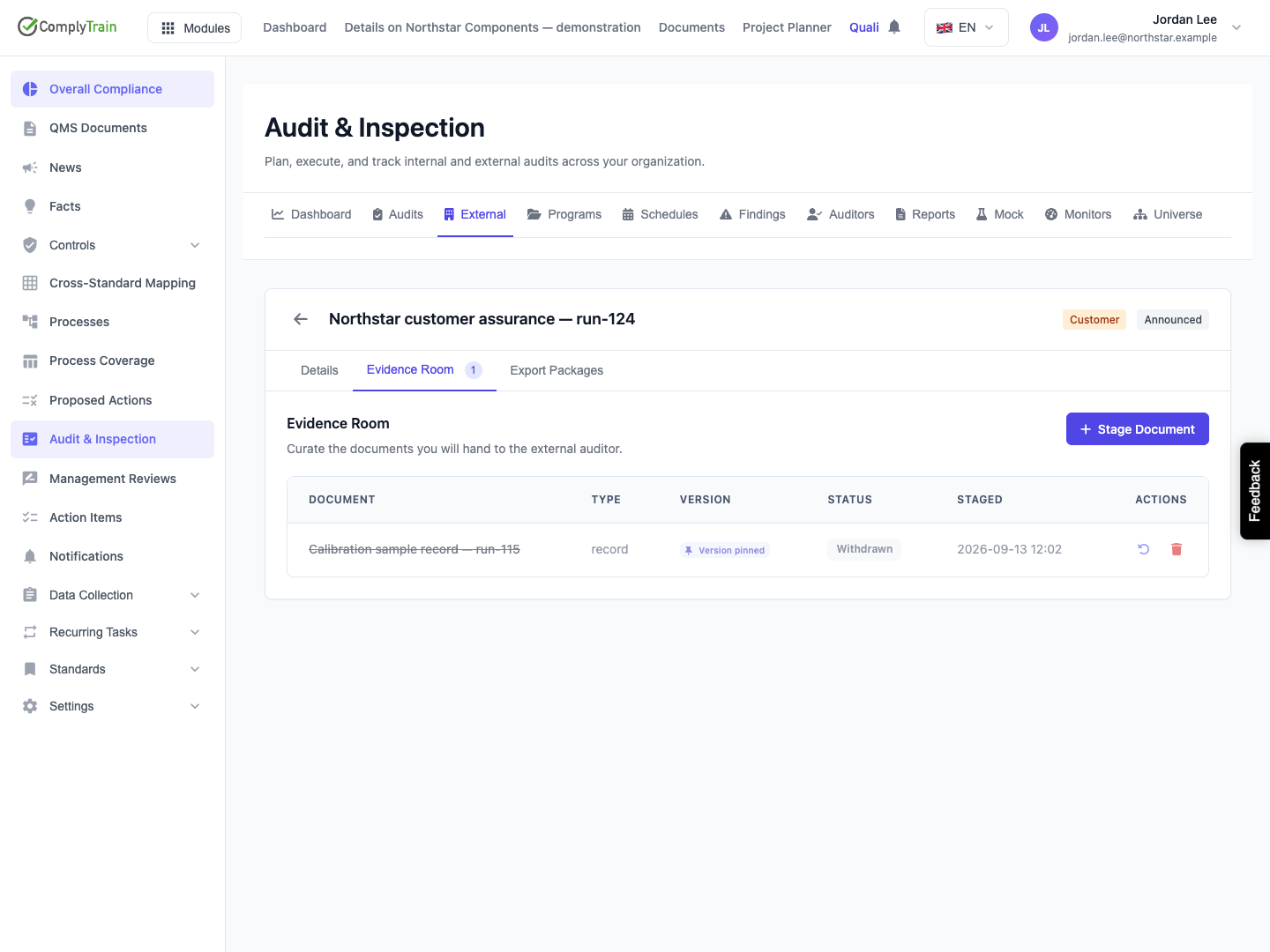
Withdraw from hand-over | Changes the entry to Withdrawn, preserving its row and version pin while excluding it from subsequent package selection. |
Restore to staged | Returns a withdrawn entry to Staged, retaining its source and pin. |
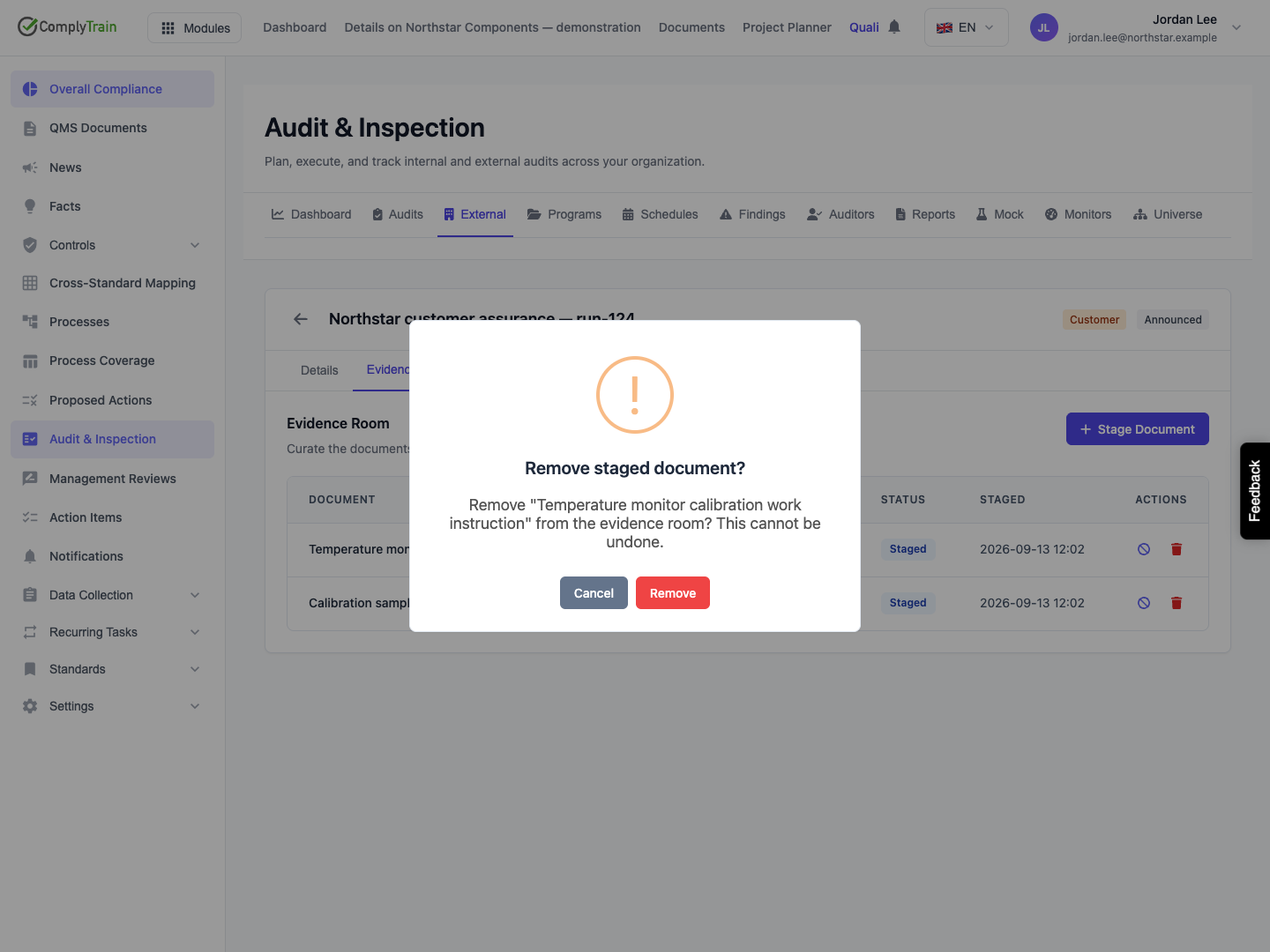
Remove | Opens a confirmation naming the staged entry. Confirming deletes that evidence-room entry; it does not delete the source document from its vault. Select Cancel to keep it. |
Prefer withdrawal when you need the selection history to remain visible in the room. Removal cannot be undone from that row, although you can stage a source again as a new entry.
These actions affect future generation. They do not rewrite an existing package, revoke a downloaded copy or prove that a recipient has destroyed material. Finish curation before requesting a package and leave it unchanged while generation is queued or running: the job reads the eligible selection when it executes.
Product location: /qms/audits. Select External → View details for the intended audit → Evidence Room. The tab and selected record are not encoded in this URL.
Situation | Next step |
|---|---|
Save is unavailable or fails | Supply a nonblank organisation and audit type, check the date order, and retain the panel while correcting entries. If the result is uncertain, inspect the list before submitting again. |
No bundleable documents appear | Check that the source is in an active vault and has a current stored version. Upload or correct it in Documents, then reopen the chooser. |
Search does not find the expected source | Search a distinctive part of its document name, not its vault name or file contents. Confirm the correct tenant and active vault. |
Stage Document is unavailable | Select an actual picker result and provide a nonblank title. |
A stage or status change fails | Reopen the room to establish the saved state before retrying; avoid adding duplicates after an uncertain response. |
A required revision is uncertain | Check the source's actual version history and the generated manifest. Do not use an unmatched version label as evidence of a specific revision. |
Only Withdrawn evidence remains | Restore or stage at least one suitable source before generating. |
The room prepares a specific hand-over. It does not assess whether the evidence is sufficient for the auditor's scope or certify the organisation's compliance.
