Build a versioned evidence ZIP, inspect its manifest and distinguish archive integrity from evidence approval.
Product location: /qms/audits. Select External → View details for the intended audit → Export Packages. The tab and selected record are not encoded in this URL.
Open Quality (QMS) → Audit & Inspection → External, choose View details for the intended organisation, and review its Evidence Room. You need Manage Audits access for package creation, history, download and verification.
At least one referenced document must be Staged or Shared. Withdrawn entries are excluded. Generation rejects a room without eligible evidence before creating a package version. Check each source, its approval state, the intended revision and the information you intend to disclose before proceeding.
Keep the room unchanged while a job is queued or generating. The job reads the eligible selection when it executes, rather than preserving the entire selection at the instant the button is clicked. A source version pin fixes that source revision; it does not freeze which entries are currently eligible.
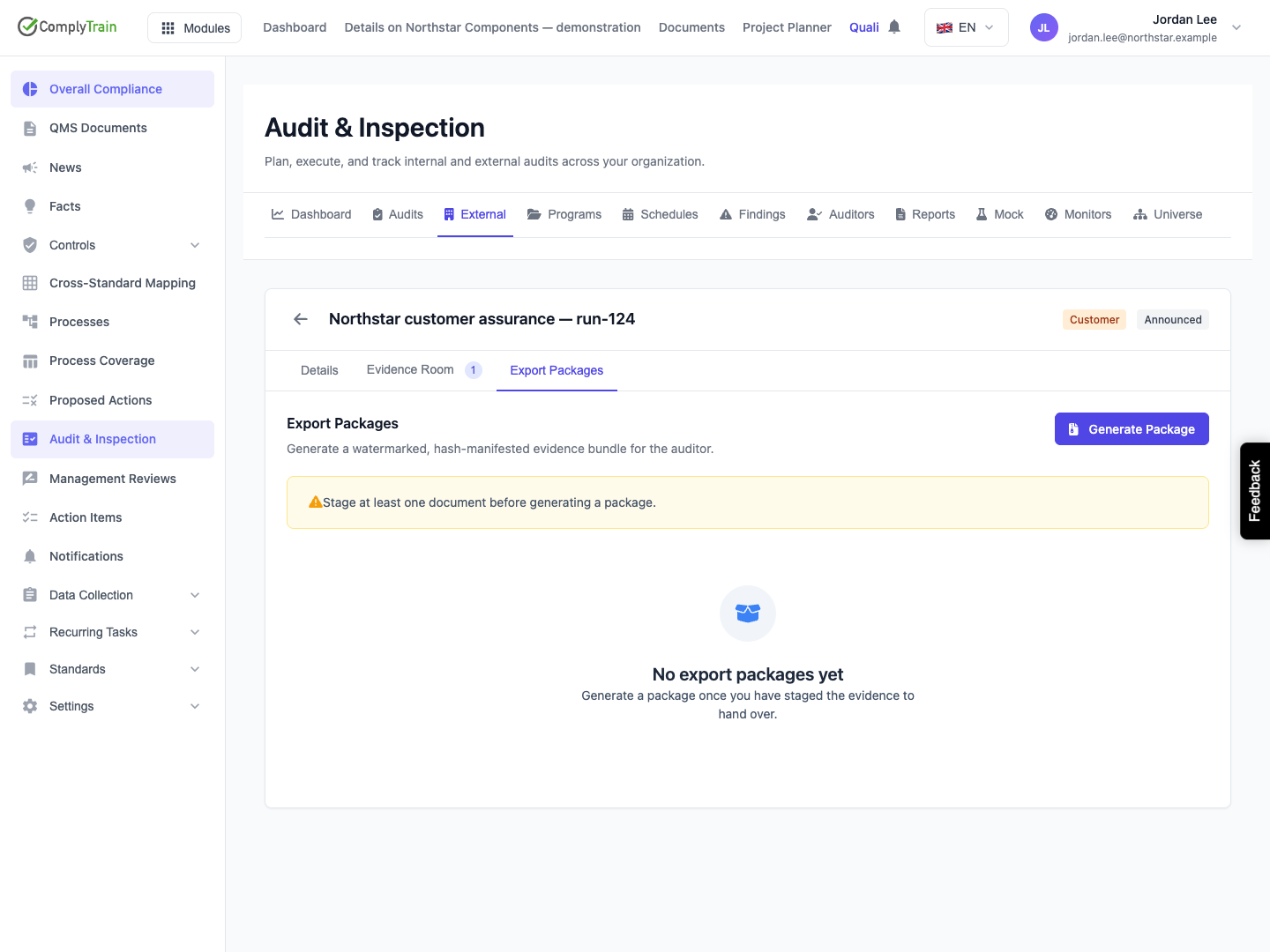
Product location: /qms/audits. Select External → View details for the intended audit → Export Packages. The tab and selected record are not encoded in this URL.
Select Export Packages → Generate Package. A new numbered version appears in the table. The page follows its progress automatically.
Status | Meaning and action |
|---|---|
Queued | The request exists and is waiting for the generation job. The archive is not ready to download. |
Generating | The job is resolving evidence and building the archive. Keep the evidence selection stable. |
Ready | The archive has been stored and its hashes and file records saved. Download and Verify integrity are available. |
Failed | Generation did not produce a ready package. Read the failure text, correct its cause and request a new version. |
Generate Package is unavailable while any listed version is Queued or Generating. Leaving the detail stops that page's status polling; reopening it loads the history and resumes polling for an active package. A temporary status-check failure displays a retry notice and the page continues checking. Do not treat that notice as proof that generation failed or create another external-audit record to bypass it.
The table shows version, state, file count, size, generation date and available actions. File count includes the generated summary and manifest as well as evidence files. Blank counts or dates while a request is running are not a zero-file success.
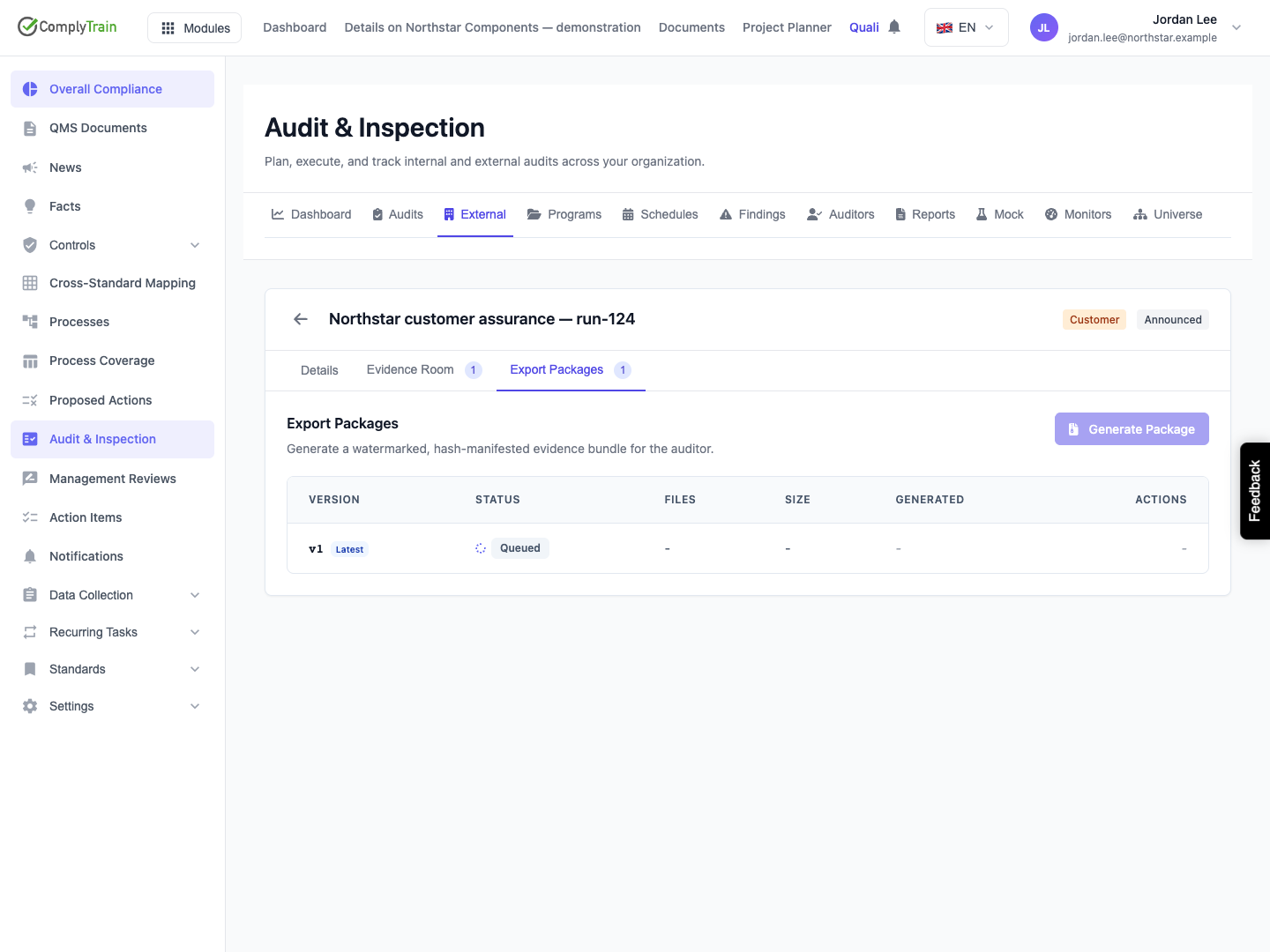
Product location: /qms/audits. Select External → View details for the intended audit → Export Packages. The tab and selected record are not encoded in this URL.
Use Download package on the exact version you intend to review. Preserve its filename and record the external audit and package version in your hand-over record. Downloading does not notify the external organisation or record its acceptance.
The ZIP contains:
Original evidence files under evidence/, with distinct archive paths to avoid collisions.
A generated summary.pdf describing the audit and package evidence.
A manifest.json recording SHA-256 hashes and provenance for the summary and evidence files.
The configured watermark targets the summary PDF. Source evidence files retain their original bytes; the package does not stamp a watermark into every evidence file or convert every source to PDF. An uploaded DOCX remains a DOCX, for example.
Inspect the output before hand-over. In the captured release, the sample summary has an incorrectly rendered date-range separator and overlapping footer text. The long watermark text exists in the PDF but is not visibly readable within the rendered page. The summary also repeats the returned date timestamps described in the evidence-room guide. Successful generation and matching hashes do not establish a clean or correctly displayed PDF; these output defects require review before use.
Open the summary and each source format you expect to provide. Check the audit identity, scope, evidence selection, revision and readability. The summary is a generated view of the available record; it does not replace the underlying evidence or the auditor's assessment. Notes entered during staging should not be assumed to appear as source-file annotations.
Product location: /qms/audits. Select External → View details for the intended audit → Export Packages. The tab and selected record are not encoded in this URL.
Select Verify integrity on a Ready row. Integrity verified means that the application's stored ZIP hashes to the whole-archive SHA-256 recorded for that package. Verification FAILED means those bytes and the recorded hash do not match. A request error is different from a completed check returning a mismatch.
The button checks the stored archive. It does not inspect the copy on your computer, independently re-hash every extracted file, confirm a digital signature or decide whether the evidence is accurate and sufficient. Its result is displayed in the current page session; rerun it after reopening when you need a fresh check.
For a recipient's verification, use the manifest in the downloaded ZIP. Each file entry includes:
Manifest field | What to check |
|---|---|
| The exact member path in this archive. |
| Whether the entry represents an evidence source or the generated summary. |
| The expected SHA-256 and uncompressed byte count of that file. |
| The managed source document, where applicable. |
| The concrete resolved source revision, where applicable. |
| Whether generation resolved a retained version pin rather than a current-version fallback. |
Re-hash the actual downloaded members and compare their sizes and hashes with the manifest. The manifest does not contain its own hash. The package record separately holds the whole ZIP hash, but the released table does not display or copy that hash. If your hand-over process requires independently comparing the downloaded ZIP with the retained package record, obtain that recorded hash through your administrator's supported evidence process; a locally computed hash alone has no trusted value to compare against.
Matching hashes establish agreement with the recorded bytes. Keep evidence approval, external acceptance and any required signing process separate from this integrity result.
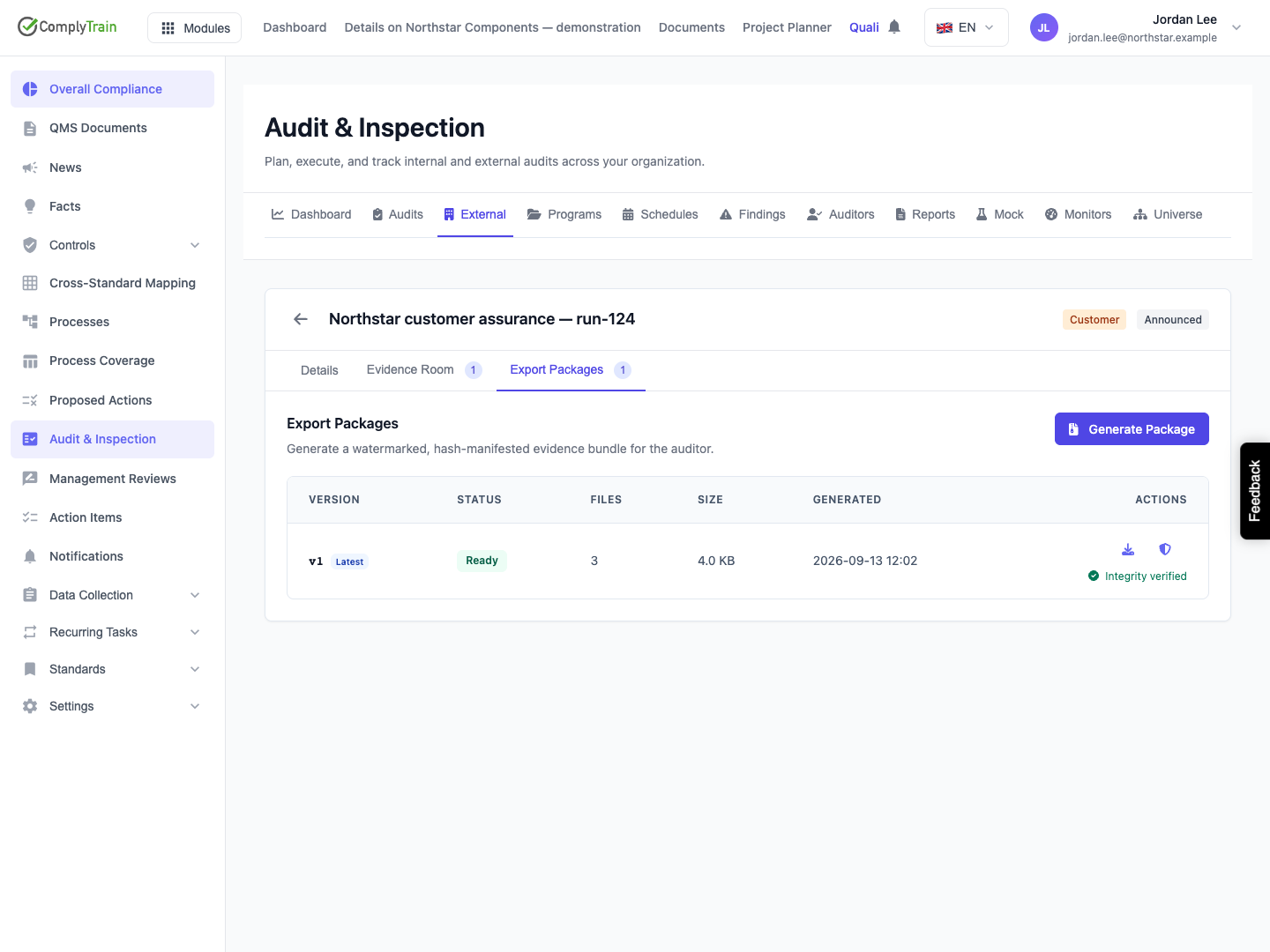
Product location: /qms/audits. Select External → View details for the intended audit → Export Packages. The tab and selected record are not encoded in this URL.
To add, replace or withdraw material for a later hand-over, revise the room and choose Generate Package again after the prior request finishes. The new request receives the next version number. Previous generated versions remain separate with their original archive and hash.
Latest means the most recently requested version, including one still queued or one that has failed. It does not mean the newest successful, approved or delivered package. Check both Latest and Ready, then choose the intended row for download.
Withdrawing or removing a source after version one is ready does not alter version one. Updating a source document does not update a retained pin in the room. To package a newer revision, deliberately stage the intended revision and exclude the obsolete entry before generation. Keep a record of which completed version was actually supplied.
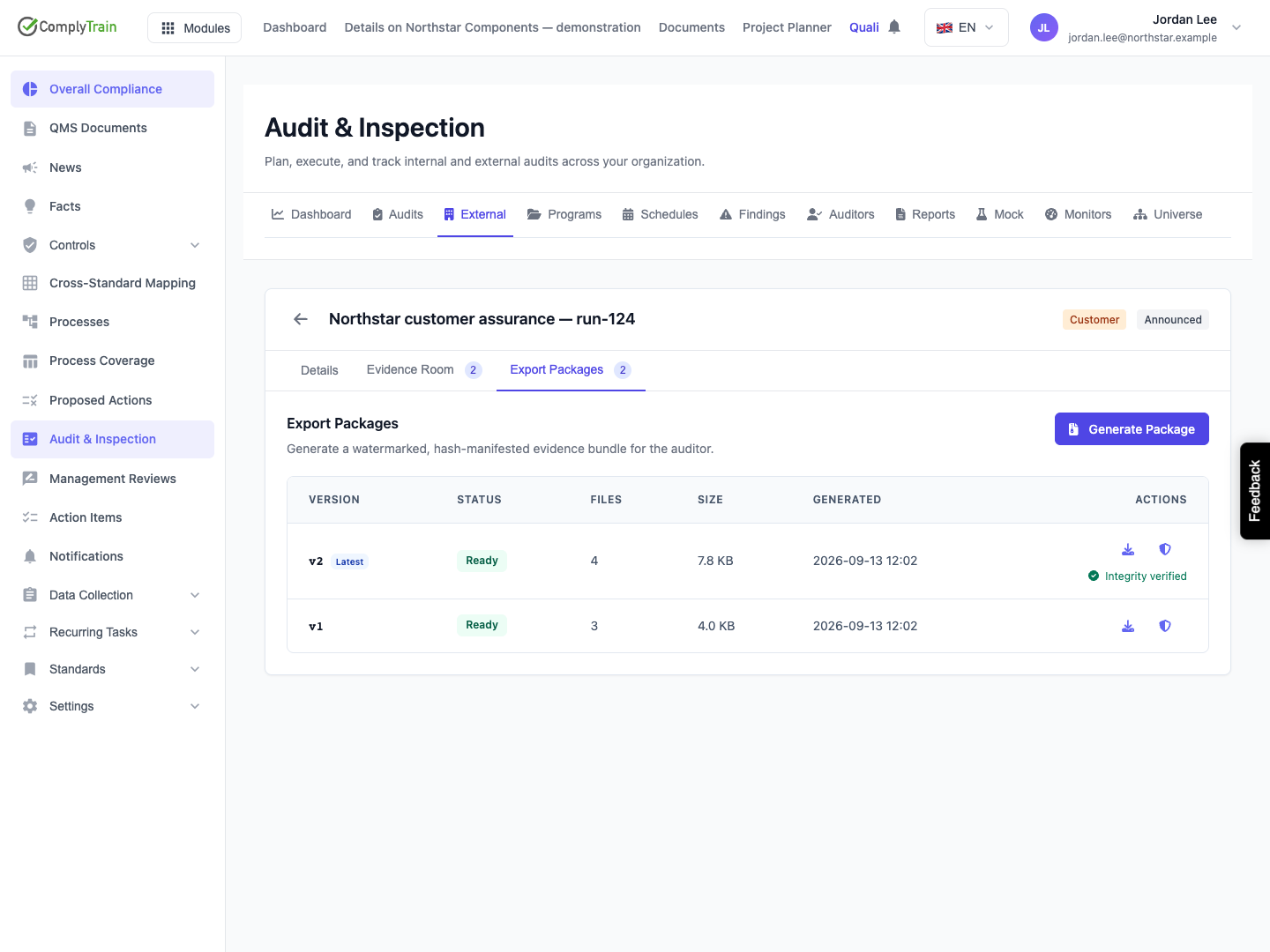
Product location: /qms/audits. Select External → View details for the intended audit → Export Packages. The tab and selected record are not encoded in this URL.
Situation | What to do |
|---|---|
Stage at least one document | Return to Evidence Room and add or restore a suitable source. A room containing only Withdrawn entries is empty for packaging. |
A curated source is unresolvable | Check the named staged entry and its retained document revision in Documents. Correct the source or replace the selection. A missing pinned revision is not silently substituted with the current version. |
A source has no recorded file size | Correct or re-upload the affected source through the normal document workflow, then stage the intended revision. Generation cannot enforce its size limit with unknown sizes. |
Evidence exceeds the configured size ceiling | Reduce the selected set or ask the administrator responsible for deployment limits. The default source-byte ceiling is 2,048 MB; it can differ by deployment and has no setting in this screen. |
Source integrity or storage access fails | Preserve the error and package version and ask the administrator to investigate the source or storage. Do not describe a partial or failed archive as complete evidence. |
Generation stays queued or running | Reopen the detail and inspect the latest state. If it persists, ask the administrator to check the generation job using the external audit and package identifiers. |
Download fails for a Ready package | Retry after checking the connection and access. If the retained object is no longer available, investigate retention or storage rather than assuming Ready guarantees perpetual availability. |
Verify integrity returns a mismatch | Preserve the package identity and result, stop treating that archive as verified and request investigation before hand-over. |
The verification request itself fails | Retry when access or service availability is restored. A failed request establishes neither a matching hash nor a mismatch. |
Every retry through Generate Package creates another version; it does not repair an earlier failed row in place. Resolve the cause first and check the history after any uncertain request outcome.
Product location: /qms/audits. Select External → View details for the intended audit → Export Packages. The tab and selected record are not encoded in this URL.
The released package screen has no delete, retention-period, watermark-text, approval, signing or recipient-management controls. Deployment configuration governs retention and watermark text. The default retention is 3,650 days, but your deployment may use another period; do not treat the default as a guarantee of indefinite availability.
Package cleanup concerns generated archives and their package records. It is separate from the underlying source document's lifecycle. Preserve the approved hand-over archive, its relevant integrity evidence and the actual delivery record according to your organisation's procedure. No external delivery occurs merely because a package is Ready.
