Read recorded actions, actors and reasons, expand event details and interpret the scope of the integrity result.
Product location: /qms/audits. Open the intended engagement, finding or report and expand History & Integrity. The tab and selected record are not encoded in this URL.
Open an audit engagement, finding or report that exposes History & Integrity. The panel records actions for the selected entity. For example, a report's creation event belongs to that report, while events for its parent engagement are inspected from the engagement.
Viewing the timeline and requesting the associated chain check require Manage Audits access. The panel loads its event list and integrity result separately. An unavailable integrity check does not necessarily mean the event list failed, and a loaded list does not establish a successful integrity check.
Product location: /qms/audits. Open the intended engagement, finding or report and expand History & Integrity. The tab and selected record are not encoded in this URL.
Each event can show the action description, sequence number, actor, timestamp, action code, entity name, reason and a non-success result badge where recorded. Read these together rather than interpreting a status badge alone.
Item | Meaning |
|---|---|
Description and action | The recorded operation, such as creation, verification or unlocking. The description can be translated; an unfamiliar event can use a readable form of its action code. |
Sequence number | The position recorded in the tenant event chain. Events for other records can occupy intervening positions, so gaps between this entity's displayed numbers are not themselves missing history. |
Actor | The identity stored with the event. System appears when no user identity is recorded; that label alone does not establish which process initiated the action. |
Timestamp | The recorded event time, displayed with a time of day even when the ordinary date preference omits it. Check the applicable display timezone when comparing other records. |
Reason | The reason retained for an action that records one, such as a privileged unlock. An empty reason is not proof that a reason was required or supplied elsewhere. |
Result | A non-success badge distinguishes a recorded unsuccessful outcome from an ordinary successful event. An event's existence alone is not evidence that the requested change succeeded. |
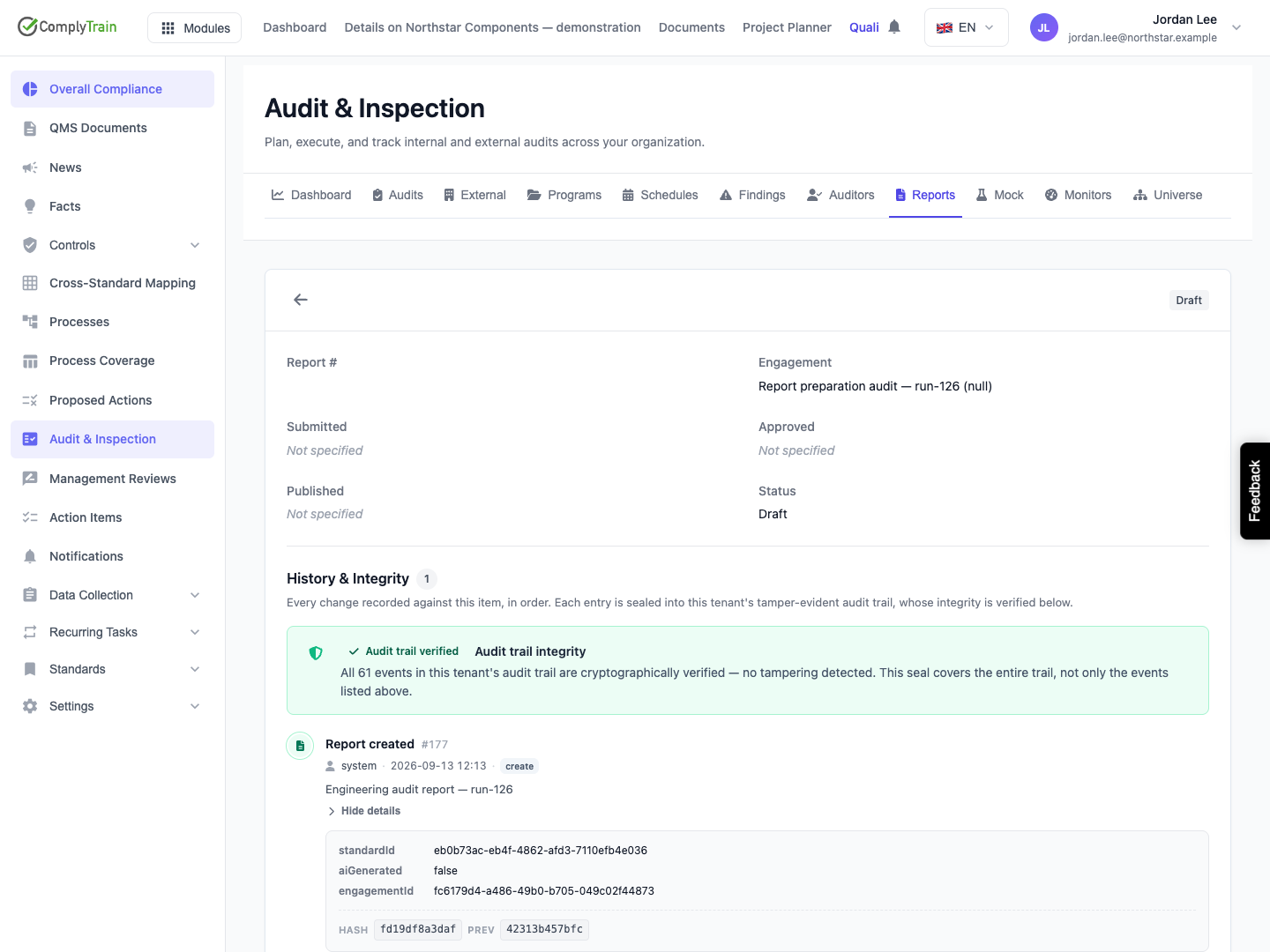
In the illustrated example, Jordan Lee created the report through the UI, but its creation event displays system. The retained report separately identifies its creator. Corroborate actor identity from the available source records; do not describe this event label as proof of an autonomous system action.
The displayed event count belongs to the selected entity. The panel loads 50 events at a time; use Load more when additional records remain. The loaded page is not necessarily the full history. There is no event-editing, deletion, export, text-search or date-filter control in this panel.
Product location: /qms/audits. Open the intended engagement, finding or report and expand History & Integrity. The tab and selected record are not encoded in this URL.
Choose Show details on an event to inspect the data it retained. Use Hide details to collapse it. Depending on the action, the data can identify a standard, parent engagement, previous state, new state or other operation-specific context.
The hash display abbreviates the current and previous hashes to their first 12 characters. Hover over a hash to see its full value in the tooltip. A shortened display is useful for recognition; it is not the complete hash to use for an independent comparison.
The details describe what the event actually stored. They are not a complete copy of every field in the current product record, the evidence file or the record before and after every change. Inspect the underlying source separately when a particular value or attachment matters.
Product location: /qms/audits. Open the intended engagement, finding or report and expand History & Integrity. The tab and selected record are not encoded in this URL.
The integrity indicator checks the tenant's complete audit-event chain, not just the visible entity's events or the currently loaded page. Its checked-entry count can therefore be much larger than the timeline count.
Result | Interpretation and next step |
|---|---|
Verification in progress | Wait for the result; a loading indicator is not a pass. |
Verified / intact chain | The chain checks succeeded for the entries examined. Read any legacy-entry qualifier shown alongside the success state. |
Legacy entries verified | Older unkeyed entries passed their consistency check. The displayed qualifier explains that this does not provide the same assurance against someone capable of recomputing those hashes. Do not omit the qualifier when recording the result. |
Verification failed | Inspect the reported sequence and reason. Preserve the record identity and result and ask the administrator to investigate. The failure may concern another entity in the same tenant chain. |
Verification unavailable | The request could not establish a result. Check access and service availability, then reload. Unavailable is different from a completed verification finding a broken chain. |
An intact chain does not establish that the recorded decision was correct, the actor was authorised by your organisation's procedure, every possible product action was logged, or the evidence satisfies an auditor. It also does not approve, sign, publish or lock the underlying record.
Product location: /qms/audits. Open the intended engagement, finding or report and expand History & Integrity. The tab and selected record are not encoded in this URL.
If the timeline request fails, use Retry after checking your access and connection. Retry reloads both the timeline and the chain result, starts from the first page and clears expanded details. Reopen or refresh after a new action when you need a current view; the displayed result reflects its last successful load.
An empty timeline means no events were returned for the selected entity. Confirm that you opened the intended engagement, finding or report before concluding that no event exists. A valid tenant chain can coexist with an empty entity timeline.
When requesting investigation, retain the entity identity, event sequence, timestamp, displayed outcome and any reason or full hash relevant to the question. Keep that record separate from a statement that an audit, report or finding has been approved.
