Use field references, conditions and aggregate functions to produce checked form results.
A calculated field derives a result from other answers. Configure its Formula in the field editor and give the result a label and unit. Respondents change the inputs; the result is read-only.
Product location: /qms/{standardCode}/forms/{templateId}/edit (fallback: /qms/standards). Open the intended standard, choose Forms, then Edit Form on the accessible template.
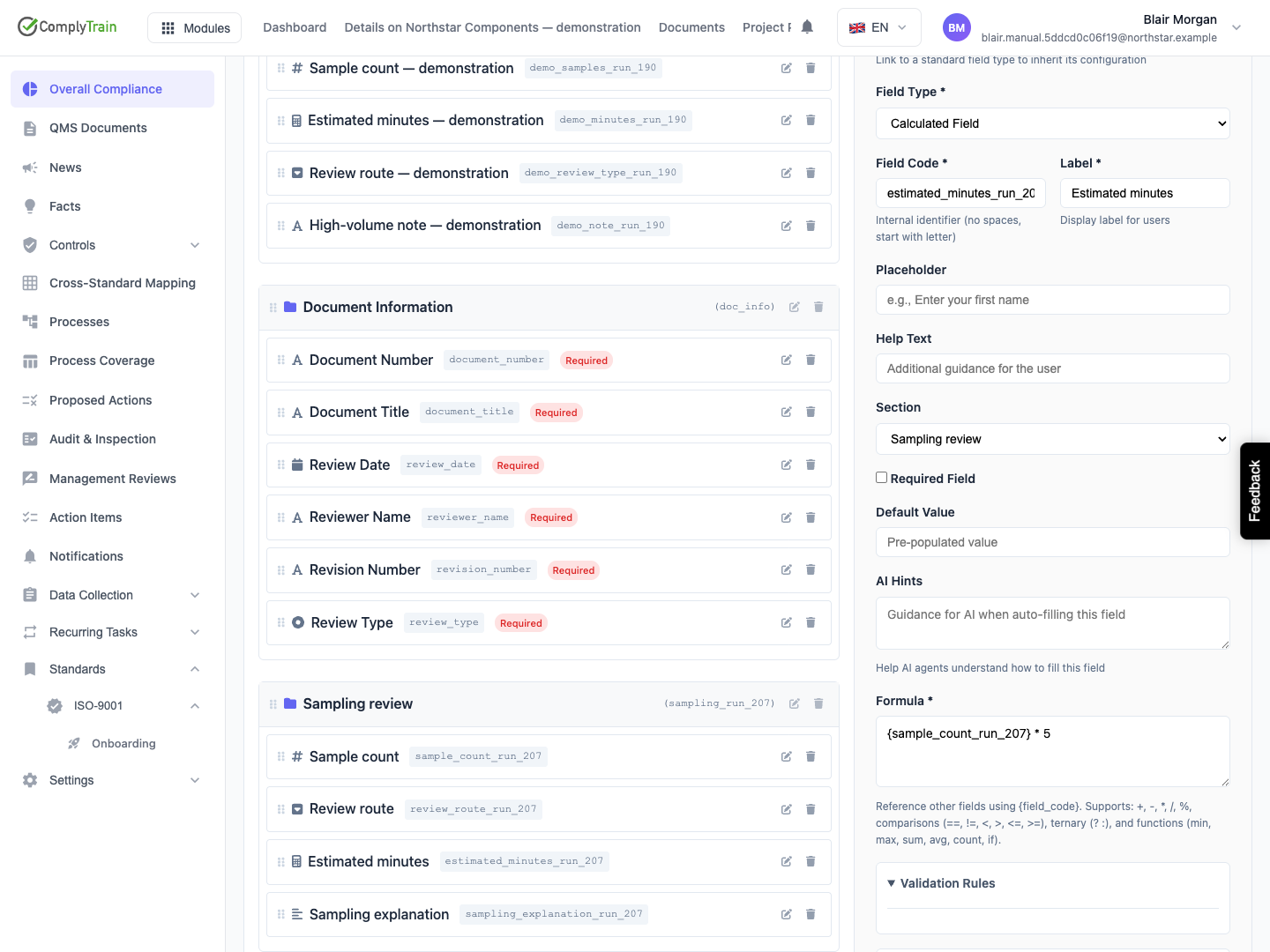
Enclose a field code in braces, such as {sample_count}. Use the exact code from the form definition, including any suffix. A label such as “Number of samples” is not the code.
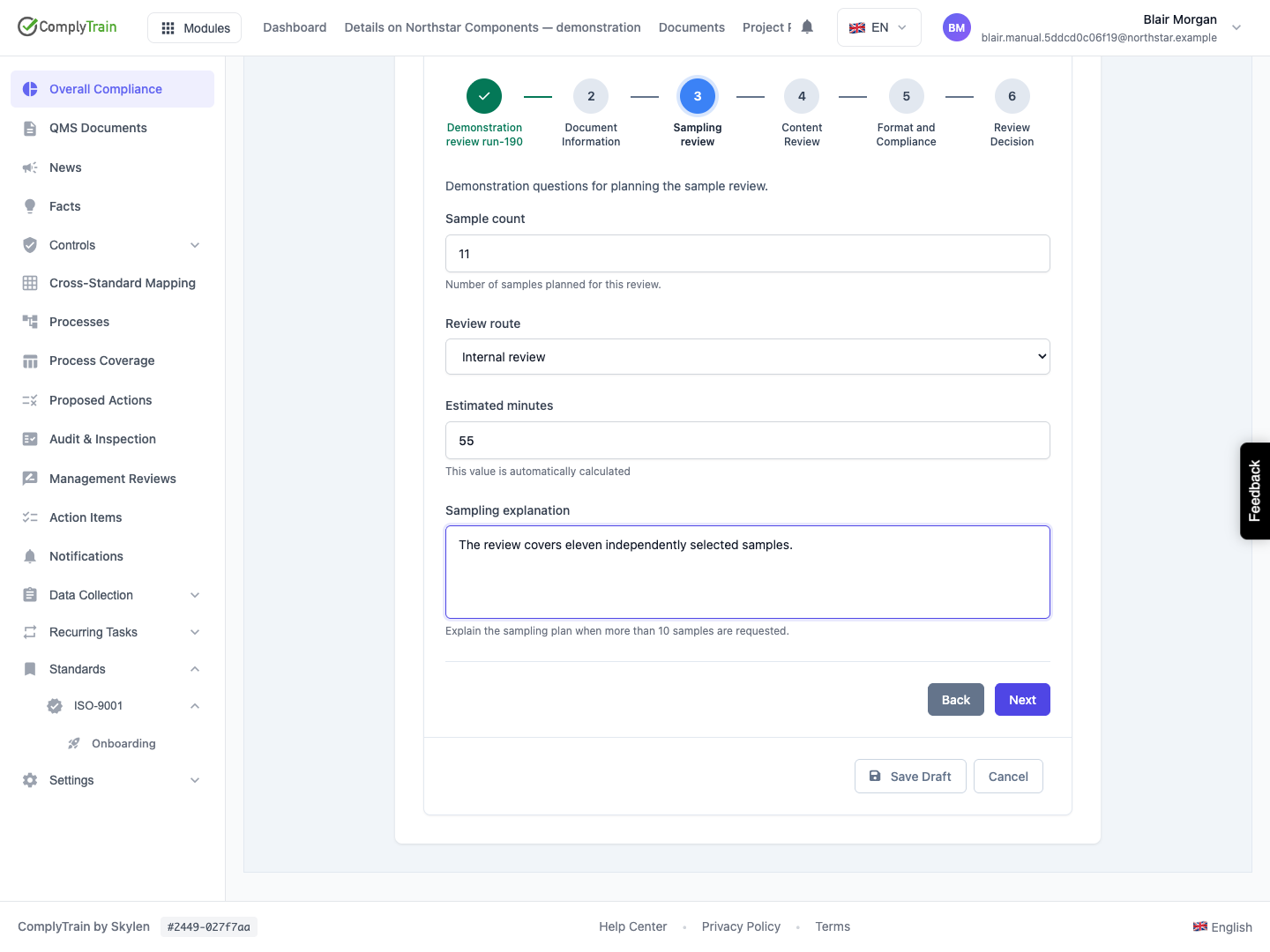
For estimated minutes at five minutes per sample, use {sample_count} * 5. Counts of 0, 3 and 10 should produce 0, 15 and 50. These numbers illustrate the calculation; choose a factor appropriate to your process.
Keep referenced codes stable. Review dependent formulas before renaming or deleting their input fields.
Product location: /qms/{standardCode}/forms/{templateId}/edit (fallback: /qms/standards). Open the intended standard, choose Forms, then Edit Form on the accessible template.
Expression | Meaning | Example result |
|---|---|---|
| Addition |
|
| Subtraction |
|
| Multiplication |
|
| Division |
|
| Remainder |
|
| Negative value |
|
| Evaluate the grouped expression first |
|
Use decimals where appropriate, such as {quantity} * 2.5. Parentheses help make the intended order explicit when combining operations. Check units as well as arithmetic: adding minutes to a sample count does not produce a meaningful result.
Product location: /qms/{standardCode}/forms/{templateId}/edit (fallback: /qms/standards). Open the intended standard, choose Forms, then Edit Form on the accessible template.
Comparisons use ==, !=, <, <=, > and >=. Use them as conditions in if(condition, when_true, when_false) or condition ? when_true : when_false.
For example, if({sample_count} > 10, 30, 15) produces 15 for ten samples and 30 for eleven. The equivalent expression is {sample_count} > 10 ? 30 : 15.
Use true and false for Boolean values and ! to negate a Boolean condition. Keep complex business logic readable. A short nested if can express a second decision; review every branch with an example.
Product location: /qms/{standardCode}/forms/{templateId}/edit (fallback: /qms/standards). Open the intended standard, choose Forms, then Edit Form on the accessible template.
Function | Purpose | Example |
|---|---|---|
| Lowest value |
|
| Highest value |
|
| Total |
|
| Arithmetic mean |
|
| Number of supplied values |
|
| Product of the values |
|
| Sum of each value multiplied by its corresponding weight |
|
| Select a result according to a condition |
|
Arguments can contain field references and arithmetic, for example sum({setup_minutes}, {sample_count} * 5). Supply meaningful inputs for the operation and verify the result for the intended range.
Product location: /qms/{standardCode}/forms/{templateId}/edit (fallback: /qms/standards). Open the intended standard, choose Forms, then Edit Form on the accessible template.
A group reference includes the group code, an entry position or wildcard, and the member field code. For group samples and member quantity:
Reference | Meaning |
|---|---|
| Quantity in the first entry; positions start at zero. |
| Quantity in the second entry. |
| Quantities from all entries, for use in an aggregate. |
With quantities 2, 3 and 5, sum({samples[*].quantity}) gives 10, max({samples[*].quantity}) gives 5 and count({samples[*].quantity}) gives 3.
Complete the referenced member value in each relevant entry. Review what should happen when entries are added, removed or left incomplete. A wildcard identifies several values; an aggregate turns them into a single result.
Product location: /qms/{standardCode}/forms/{templateId}/edit (fallback: /qms/standards). Open the intended standard, choose Forms, then Edit Form on the accessible template.
For repeated factors with score and weight, use weighted_sum({factors[*].score}, {factors[*].weight}). Each score is multiplied by the weight in the corresponding entry, then the products are added.
For scores 4 and 2 with weights 0.75 and 0.25, the result is 4 × 0.75 + 2 × 0.25 = 3.5. For scalar arguments, list the values first and their corresponding weights second, as in weighted_sum(4, 2, 0.75, 0.25).
Choose weights according to your methodology. This function calculates a weighted sum; if your intended measure is a weighted average, account for the total weight in the formula. Verify that values and weights correspond to the same entries.
Product location: /qms/{standardCode}/forms/{templateId}/edit (fallback: /qms/standards). Open the intended standard, choose Forms, then Edit Form on the accessible template.
Zero is a numeric answer. An unanswered field is missing information. Decide which input questions are required and which have meaningful defaults instead of treating every missing value as zero.
Protect a division with an appropriate condition when the denominator can be zero. For example, if zero samples should mean zero minutes per sample, use if({sample_count} == 0, 0, {total_minutes} / {sample_count}). Choose that fallback only when it has the intended business meaning.
If a calculation cannot be evaluated, review the referenced codes, supplied values, group entries and arithmetic. A failed or absent result must be corrected before it is used as a score or mapped into a follow-up action.
Product location: /qms/{standardCode}/forms/{templateId}/edit (fallback: /qms/standards). Open the intended standard, choose Forms, then Edit Form on the accessible template.
If an input question becomes hidden, its retained answer is excluded from the submitted response and output processing. Design the calculated question's condition and inputs together so the result is based on the answers applicable to that response.
Test the full sequence: supply an input, review the result, change an earlier answer to hide the input and inspect the final submission. A previously entered hidden value must not determine a generated record or action.
Product location: /qms/{standardCode}/forms/{templateId}/edit (fallback: /qms/standards). Open the intended standard, choose Forms, then Edit Form on the accessible template.
Write down representative inputs and expected results. Include ordinary values, zero, permitted negative or decimal inputs, each conditional branch and repeated-entry additions or removals.
Check the saved formula, preview result and submitted result. If the result drives an output rule, open the resulting record and compare the mapped value as well. ComplyTrain evaluates calculated values for the submitted response; verify the final saved result as part of the form's acceptance.
Use the illustrated calculation editor for creation and submission review for the response and its outputs.