Record your organisation's export-control determinations per regime, confirm them by a named person, use determinations inherited from parent products, keep review dates current, and run an export check whose every outcome and reason is explained.
The Export control tab records the export-control determinations your organisation makes for each version of a product, such as its ECCN under the EAR or its entry on the EU dual-use list, and checks whether the version may go to a destination for a purpose. The tab always shows the notice Tooling, not legal advice:
"This records determinations your organisation makes and licences it holds, and applies them consistently. It does not classify anything for you. Determinations and their consequences remain your responsibility, and should be made with appropriate legal advice."
Licences and the restricted-party list are described in export licences and restricted parties.
Product location: /products/{productId}/export (fallback: /products). Open the product in Products, select the version, then choose the Export control tab.
Action | Who |
|---|---|
See determinations and run an export check | Anyone with View Products ( |
Propose a determination, and discard a proposal | Manage Export Control Records ( |
Confirm a determination | Confirm Export Classification ( |
Confirming is an act of professional judgement with legal weight: the person who confirms is recorded by name and every later export decision relies on it. Grant Confirm Export Classification only to your export-control officer or equivalent. The default quality manager role does not include it. Admins can do all of these, and buttons appear only for people who can use them.
Determinations follow the product's classification, so you see only those your clearance allows; see clearances.
Product location: /products/{productId}/export (fallback: /products). Open the product in Products, select the version, then choose the Export control tab.
Open Products and choose the product in the Product register.
Select the version in the version selector. Determinations belong to a version, because a control code is a property of the configuration.
Choose the Export control tab.
Product location: /products/{productId}/export (fallback: /products). Open the product in Products, select the version, then choose the Export control tab.
The regimes a product is assessed against, such as ITAR, EAR or the EU dual-use list, are set by its product profile.
A product with no profile shows This product has no profile yet and the link Attach a profile on the Overview tab.
A profile with no regimes shows No export control regimes apply to this product and the link Open product profiles. Nothing is being withheld: export control does not apply to products of this kind. If that is wrong, the profile is what needs changing; see product profiles.
Neither state is a decision that the product is not controlled. That decision is a determination, recorded as described below.
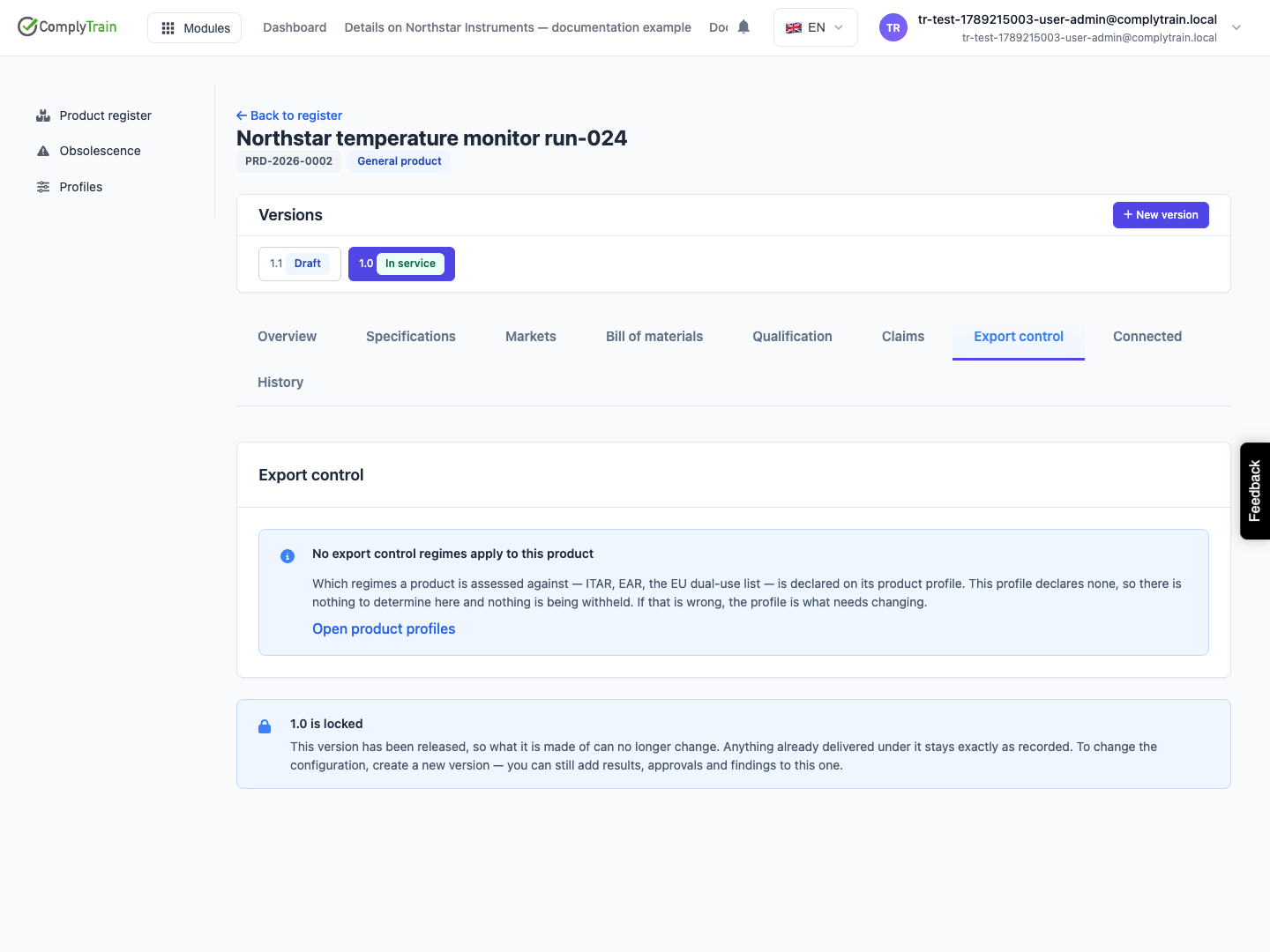
Product location: /products/{productId}/export (fallback: /products). Open the product in Products, select the version, then choose the Export control tab.
The table has one row for each regime on the profile.
Column | Shows |
|---|---|
Regime | The regime code. Inherited from and a product name when the determination comes from a parent product. |
Code | The control code, such as an ECCN or USML category, or a dash. |
State | Not determined (red), Proposed (grey), Controlled (amber) or Not controlled (green), plus Review overdue when the review date has passed. |
Determined | The date the determination was confirmed, or Not yet. |
Actions | Confirm and Discard on a proposal. |
When any regime has no determination, an amber alert says Determination missing with the number of regimes: until one is confirmed, the control status is unknown and export answers cannot be relied on. The tab label counts these regimes, and the Overview tab lists them under Needs your review as configurations without an export determination.
Product location: /products/{productId}/export (fallback: /products). Open the product in Products, select the version, then choose the Export control tab.
Choose Propose determination.
Complete the fields below.
Choose Save proposal.
Field | What it does | Rules and defaults |
|---|---|---|
Regime | The regime this determination is for. | Required. Lists the profile's regimes; defaults to the first. |
Control code | The entry on the control list, for example "5A002" or "EAR99". | Optional, up to 60 characters. |
Item is controlled | Whether the item is controlled under this regime. | Ticked by default. Clear it for a not-controlled determination. |
Basis for the determination | The control list entry consulted, the technical characteristics considered and any advice relied on. An auditor reads this, not the code. | Required, up to 10,000 characters. |
Review date | When the determination should be looked at again, for example after the next revision of the control list. | Optional. |
Supporting document | A classification memo or legal advice, chosen from a document vault. | Optional. |
The proposal shows as Proposed. It has no effect yet: export checks treat the regime as awaiting a decision until a named person confirms it. Messages: "Choose a regime." and "A basis is required for a determination."
When your organisation has set it up, Review classification opens the assistant. It works through the version against the control lists, writes down its reasoning, says where the record is silent, and can save a proposed determination. It cannot determine anything; a named person confirms. See the Product Specialist assistant.
Product location: /products/{productId}/export (fallback: /products). Open the product in Products, select the version, then choose the Export control tab.
To confirm, a holder of Confirm Export Classification reviews the code, the controlled flag and the basis, then chooses Confirm. Confirming records you by name as the person who made the determination, and every export decision relies on it. The row changes to Controlled or Not controlled with today's date under Determined.
To discard a proposal whose regime or code is wrong, choose Discard and confirm Discard this proposed determination?. Only proposals can be discarded.
A proposal can be edited until it is confirmed. A confirmed determination cannot be edited or discarded; it records a decision somebody made.
Product location: /products/{productId}/export (fallback: /products). Open the product in Products, select the version, then choose the Export control tab.
To change a confirmed determination, propose a new one for the same regime and have it confirmed. When the new one is confirmed, the old one becomes superseded and stays on record.
State | Meaning |
|---|---|
Proposed | Put forward by someone who holds Manage Export Control Records. No effect on checks. |
Confirmed | Adopted by a named person. Shown as Controlled or Not controlled and used by every check. |
Superseded | Replaced by a later confirmed determination for the same version and regime. Kept for the record. |
Product location: /products/{productId}/export (fallback: /products). Open the product in Products, select the version, then choose the Export control tab.
Products can sit under a parent product, for example a variant under its product family. When a version has no confirmed determination of its own for a regime, the check looks up the product hierarchy and uses the nearest confirmed determination on a released version of a parent, grandparent and so on. The row then shows Inherited from and that product's name.
Inheritance is worked out each time it is read, not copied. When the parent's determination changes, every child shows the new one at once. A version's own confirmed determination always takes precedence over an inherited one; propose and confirm one when the child differs from its family.
Product location: /products/{productId}/export (fallback: /products). Open the product in Products, select the version, then choose the Export control tab.
A confirmed determination with a review date shows Review overdue once that date passes, and every export check for the version adds a warning that the determination was due for review. Control lists are revised, so a determination made against an old list is an assumption with a date on it.
The review-due list shows every confirmed determination across your products whose review date has passed or falls within the next 30 days, soonest first. To complete a review, propose and confirm a determination with a new review date, even if the code is unchanged.
Product location: /products/{productId}/export (fallback: /products). Open the product in Products, select the version, then choose the Export control tab.
With the version selected, enter the Destination: a country or region-group code, such as DE or US. Upper and lower case are both accepted.
Choose the Purpose: Bid (the default), Share or Ship.
Optionally, name the end user: the organisation that will receive the product. The end user is screened against your restricted-party list.
Choose Check.
The result shows Permitted (green), Needs attention (amber) or Not permitted (red), with the reason. When several things were checked, each finding is listed with its own outcome. The worst finding decides the result: one Not permitted outweighs any number of Permitted.
Needs attention is not a pass. It means you may proceed, but something needs a person to look at it.
Every check is recorded, whatever its result, with who asked, when, the destination, the purpose and the outcome; see the decision trail.
Product location: /products/{productId}/export (fallback: /products). Open the product in Products, select the version, then choose the Export control tab.
Each regime on the profile is checked, and the end user is screened when you name one.
Situation | Result | What it means and what to do |
|---|---|---|
No regimes on the profile | Permitted | Export control does not apply to products of this kind. |
Determined not controlled | Permitted | The confirmed determination says the item is not controlled under the regime. |
Controlled, no destination given | Permitted | The item is controlled, but with no destination there was nothing to test. Enter a destination for a real answer. |
A licence permits the destination | Permitted | A valid licence for this regime names the destination. The reason names the licence. |
No determination on file | Needs attention | The control status is unknown. Propose and confirm a determination before relying on the answer. |
Determination proposed, not confirmed | Needs attention | A proposal exists but nobody has confirmed it. Ask your export-control officer to confirm or discard it. |
Determination due for review | Needs attention | The review date has passed. Review it and confirm a current determination. |
Licence nearly consumed | Needs attention | A licence permits the destination but is 90% or more consumed. Confirm there is headroom before committing. |
No licence for the destination | Not permitted | The item is controlled and no licence for this regime names the destination. A licence naming a region group, such as EU, does not cover its member countries individually; the destination must match what the licence names. |
Licence expired | Not permitted | The only licence for the destination is past its end date. Renew it. |
Licence suspended or revoked | Not permitted | The licence has been suspended or revoked; the reason recorded on it is shown. |
Licence not yet valid | Not permitted | The licence's start date is in the future. |
Licence fully consumed | Not permitted | Recorded use has reached the licence's quantity or value ceiling. A further shipment needs a new licence. |
End user not on the licence | Not permitted | The licence names specific end users and the one you entered is not among them. A licence that names no end users is not restricted this way. |
End user matches the restricted-party list | Not permitted | The end user's name matches an entry on your restricted-party list. The reason names the entry, its source list and the match confidence. Confirm the identity before going further. |
End user could not be screened | Needs attention | Screening was not possible, so treat the end user as unscreened rather than clear. |
When several licences name the destination, a usable one gives the answer. When none is usable, the reason describes the licence closest to being usable.
Product location: /tender/workspaces/{workspaceId} (fallback: /tender/workspaces). Open the tender workspace and choose the Products tab.
Tenders run the same check when a version is bid into a market: the market is the destination and the purpose is Bid. The version must also be released and in a marketable lifecycle state. A Not permitted result blocks the bid, and Needs attention is shown as Export control warning on the tender's Products tab. See claims in a tender.
Product location: /products/{productId}/export (fallback: /products). Open the product in Products, select the version, then choose the Export control tab.
A product family "Field radio" has a confirmed EAR determination 5A002 on its released version. A new variant, "Field radio Export", sits under it.
On the variant's Export control tab, the EAR row shows Controlled, 5A002 and Inherited from Field radio.
The variant has reduced encryption, so the engineer chooses Propose determination, selects EAR, enters "5A992", keeps Item is controlled ticked, explains the technical basis and adds a review date for next year. The proposal shows Proposed; export checks keep using the inherited 5A002 until it is confirmed.
The export-control officer reviews the basis and chooses Confirm. The row shows Controlled, 5A992, with today's date, and no longer says Inherited from.
A bid manager enters Destination BR, Purpose Bid, and chooses Check. With no licence naming BR, the result is Not permitted: "No EAR licence on file permits BR for this product."
