Record test results against a product version, understand validity and waivers, read the coverage table and its gap reasons, check a contract end date, and see why qualification never carries over to a new version.
The Qualification tab records the tests a product version has been put through, for how long each result is valid, and what is still missing. Results belong to one version. A new version never inherits the qualification of the version before it: the gap is shown, because a claim that was never tested against this configuration cannot be supported.
Qualification feeds other work. Claims can be backed by a valid passed result, Tenders draw on valid passes when proposing answers and when checking a contract period, and daily reminders warn before a result lapses.
Product location: /products/{productId}/qualification (fallback: /products). Open the product in Products, select the version, then choose the Qualification tab.
Action | Who |
|---|---|
See results, coverage and gap explanations | Anyone with View Products ( |
Record, edit or remove results | Manage Testing and Qualification ( |
Admins can do all of these. Buttons appear only for people who can use them. A result follows the classification of the version it belongs to, so you see only the results your clearance allows; see clearances.
Product location: /products/{productId}/qualification (fallback: /products). Open the product in Products, select the version, then choose the Qualification tab.
Open Products and choose the product in the Product register.
Select the version in the version selector.
Choose the Qualification tab. Its heading is Testing and qualification.
Everything on this tab belongs to the selected version. Switch versions to see another version's results.
Product location: /products/{productId}/qualification (fallback: /products). Open the product in Products, select the version, then choose the Qualification tab.
Which tests a product is expected to pass is set by its product profile. A profile lists test regimes, such as EMC, Environmental or Electrical safety, and each regime offers test methods. Each regime on the profile is marked Required, Recommended or Optional.
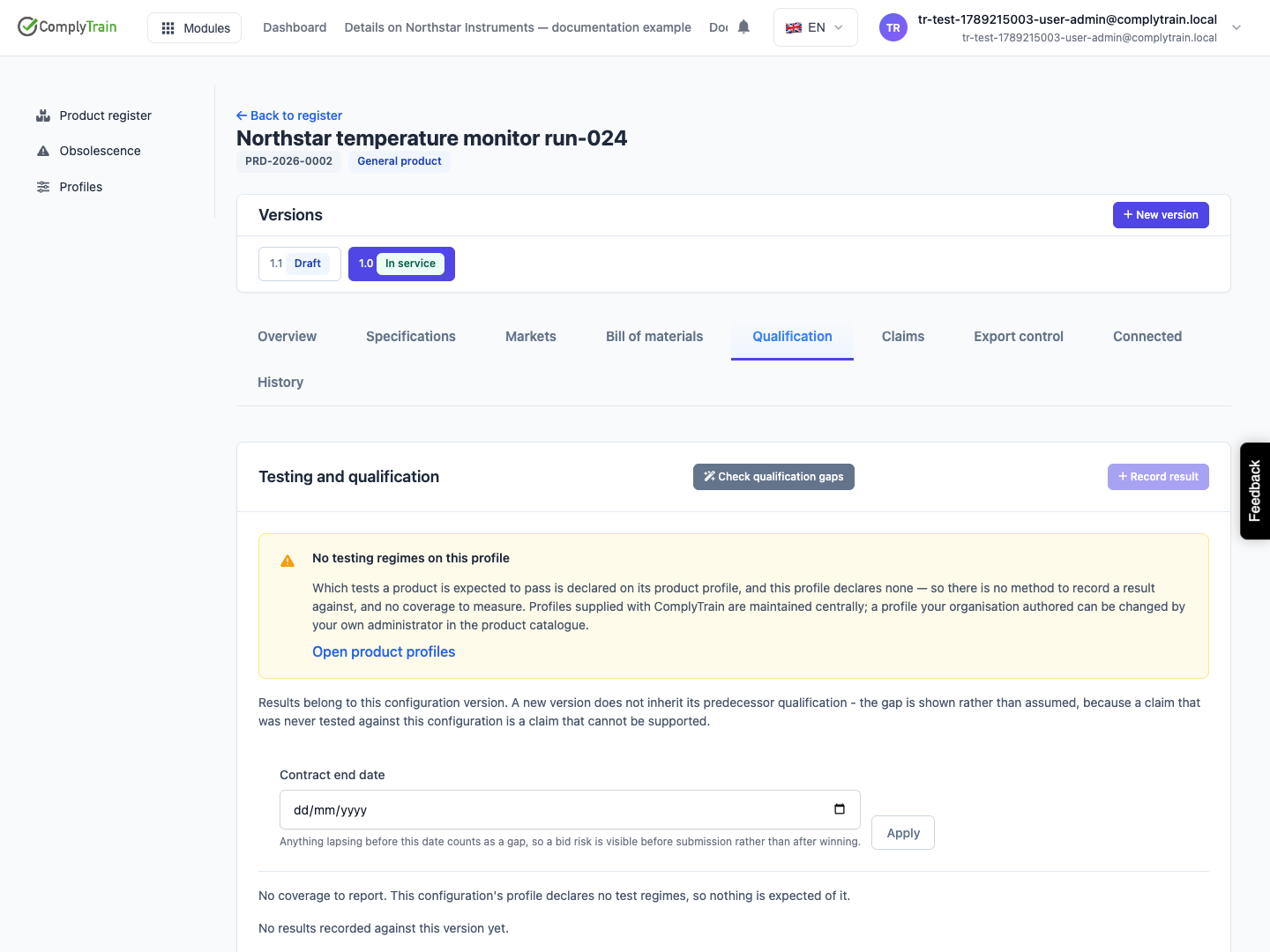
If the profile lists no regimes, the tab shows No testing regimes on this profile and Record result is unavailable: there is no method to record a result against and no coverage to measure. The panel links to Attach a profile on the Overview tab when the product has no profile yet, or to Open product profiles when it has one. See product profiles. Profiles supplied with ComplyTrain are maintained centrally.
Product location: /products/{productId}/qualification (fallback: /products). Open the product in Products, select the version, then choose the Qualification tab.
Choose Record result.
Complete the fields below.
Choose Save.
Field | What it does | Rules and defaults |
|---|---|---|
Method | The test method, shown as regime, unit, method code and name, for example "MIL-STD-810 Method 514.8 — Vibration". | Required. Lists the active methods of the profile's regimes. Defaults to the first. |
Status | Planned, In progress, Passed, Failed or Waived. | Defaults to Passed. |
Performed | The date the test was performed. | Defaults to today. |
Valid until | The last day the result counts as qualification. | Optional. Left blank on a Passed result, it is filled in from the method's default validity, or the regime's, counted from the performed date. |
Report number | The reference on the test report. | Optional, up to 200 characters. |
Laboratory | The test house that performed the test, chosen from the organisations in your stakeholder register. | Optional. Add the laboratory to the register first. |
Report document | The test report, chosen from a document vault. | Optional. The report stays in the vault with its own access control and history. |
Market | The market the result applies to. | Optional. Blank means the result applies to All markets. |
Why is testing being waived? | Shown when Status is Waived. | Required for a waiver. |
The result appears in the list below the coverage table, and the coverage table is recalculated.
If you choose Save without a method, the page says "Choose a method first." A waiver without a reason is refused with "A waiver requires a rationale."
Product location: /products/{productId}/qualification (fallback: /products). Open the product in Products, select the version, then choose the Qualification tab.
A passed result qualifies the version only while it is inside its validity: on or before its Valid until date. A pass with no end date, because neither you nor the method or regime set one, stays valid until you record otherwise. A waiver also covers its method; see the next section.
The default validity is a convenience. When the certificate states a different date, enter it in Valid until; your date always wins.
When a pass passes its Valid until date, its badge in the results list changes to Expired in red, the coverage table shows the method as Expired, and claims backed by it stop being assertable. Reminders start 180 days before the date and go to the product's regulatory contact, or its owner; see expiry reminders.
Product location: /products/{productId}/qualification (fallback: /products). Open the product in Products, select the version, then choose the Qualification tab.
Record a waiver when a test the profile expects will deliberately not be performed, for example because the configuration is identical to one already tested, or the customer has accepted another standard.
Choose Record result, select the Method and set Status to Waived.
In Why is testing being waived?, write the justification an auditor would need.
Choose Save.
A waiver covers the method. The coverage table shows it as Waived with its reason, and it does not block qualification or a bid.
A waiver applies only to the version it was recorded on and, when you set a market, only to that market. It does not carry over: a new version needs its own test or its own waiver.
A waiver never backs a claim. Claims need a passed test that is still in date; see claims. A waiver without a reason is a gap that looks like a pass, which is why the reason is required.
Product location: /products/{productId}/qualification (fallback: /products). Open the product in Products, select the version, then choose the Qualification tab.
The coverage table lists every method the version is expected or known to need:
every method of the regimes on the profile;
any method the previous version was qualified on, even if the profile does not list it;
any other method you recorded a result for.
For each method, the result that counts is a pass that is still valid or a waiver; otherwise it is the most recent result.
Column | Shows |
|---|---|
Method | The method name, with the regime and method code underneath. |
Expected | Required, Recommended or Optional, as the profile sets for the regime. A dash means the profile does not list the method. |
State | Qualified, Waived, or the reason for the gap. |
Valid until | The validity date of the result that counts. |
State | What it means | What to do |
|---|---|---|
Qualified | A passed result that is still valid. | Nothing, until its reminder arrives. |
Waived | A waiver is recorded for this method, and its reason is shown on the line. The method counts as covered. | Nothing, unless the reason no longer holds. |
Never tested | No result for this method on this version, and none on the previous version. | Plan and perform the test, or record a waiver. |
Not passed | The result that counts is planned, in progress or failed. | Complete or repeat the test, or record a waiver. |
Expired | The pass that counts is past its Valid until date, or lapses before the contract end date you applied. | Re-test, or record the renewed validity. |
Only on previous version | The previous version holds a valid pass, and this version has no result. The line adds "Passed on version" and the label. | Re-test this version, or record the result against it. |
Results recorded for a specific market count towards coverage too. The market matters when a Tender bids into a particular market: only results for that market or for all markets are offered there.
Product location: /products/{productId}/overview (fallback: /products). Select the new version and use Record a relationship under Related products to record that it supersedes the previous version.
A result obtained on version 1.0 says nothing about version 2.0, because the configuration changed. When the previous version holds valid passes that this version lacks, an amber alert appears: Qualification does not carry over, with a count and the advice to re-test or record the result against this configuration. The affected lines read Only on previous version.
The previous version is the version this one supersedes. ComplyTrain records that link when you release a version of a product that has no market records. You can also record it yourself with a Supersedes relationship under Related products on the Overview tab, for example to see the gaps while the new version is still a draft; see related products.
Product location: /products/{productId}/qualification (fallback: /products). Open the product in Products, select the version, then choose the Qualification tab.
Before bidding, check whether anything lapses during the contract.
In Contract end date, enter the date the contract would end.
Choose Apply.
Any qualified line whose result expires before that date changes to Expired, so the bid risk is visible before submission rather than after winning. A result with no end date stays Qualified, and a waiver stays Waived. The date is not saved with the product; clear it and choose Apply to return to today's view.
A Tender runs the same check for every version it bids once you set its contract period, under Qualifications lapsing inside the contract on its Products tab.
Product location: /products/{productId}/qualification (fallback: /products). Open the product in Products, select the version, then choose the Qualification tab.
Edit a result to correct it or to record what happened next, for example a planned test that has now passed. Editing re-arms its expiry reminder, so a corrected date is reminded about on its own terms.
Remove a result only when it was recorded in error: choose the bin button (Remove result) and confirm Remove this test result?. Coverage is recalculated without it. A qualification that genuinely lapsed should stay: it keeps its record and simply stops being valid, which is what an auditor needs to see.
Product location: /products/{productId}/qualification (fallback: /products). Open the product in Products, select the version, then choose the Qualification tab.
Under the tab, Why this is not yet qualified offers Explain the gaps. The assistant reads the recorded results and writes a short explanation of what is missing and why. The text is not saved. When nothing is missing, it says "Nothing is missing. This configuration has qualification recorded for every regime that applies to it."
When your organisation has set it up, Check qualification gaps opens the assistant in a conversation: it asks which market you mean and reports what the version still needs before it could be placed there. It reports what the register holds; it cannot qualify a version or decide that a test passed. See the Product Specialist assistant.
Product location: /products/{productId}/qualification (fallback: /products). Open the product in Products, select the version, then choose the Qualification tab.
Version 2.0 of a field radio changes the enclosure. Version 1.0 holds valid EMC and vibration passes.
Release 2.0, or record that it supersedes 1.0. The Qualification tab for 2.0 shows Qualification does not carry over, with both methods at Only on previous version.
Book both tests and record each with Status Planned. The lines move to Not passed until results arrive.
After the vibration test, record it as Passed with the Report number and the laboratory. Valid until fills in from the method's default validity, and the line becomes Qualified. Do the same for EMC when its report arrives.
Enter the tender's Contract end date and choose Apply to see whether the vibration pass lasts the whole contract.
