
Choose the destination, document eligibility and indexing options for each vault link.
Create the link
Product location: /document-vault/vaults/{vaultId}/kb-links (fallback: /document-vault/vaults)
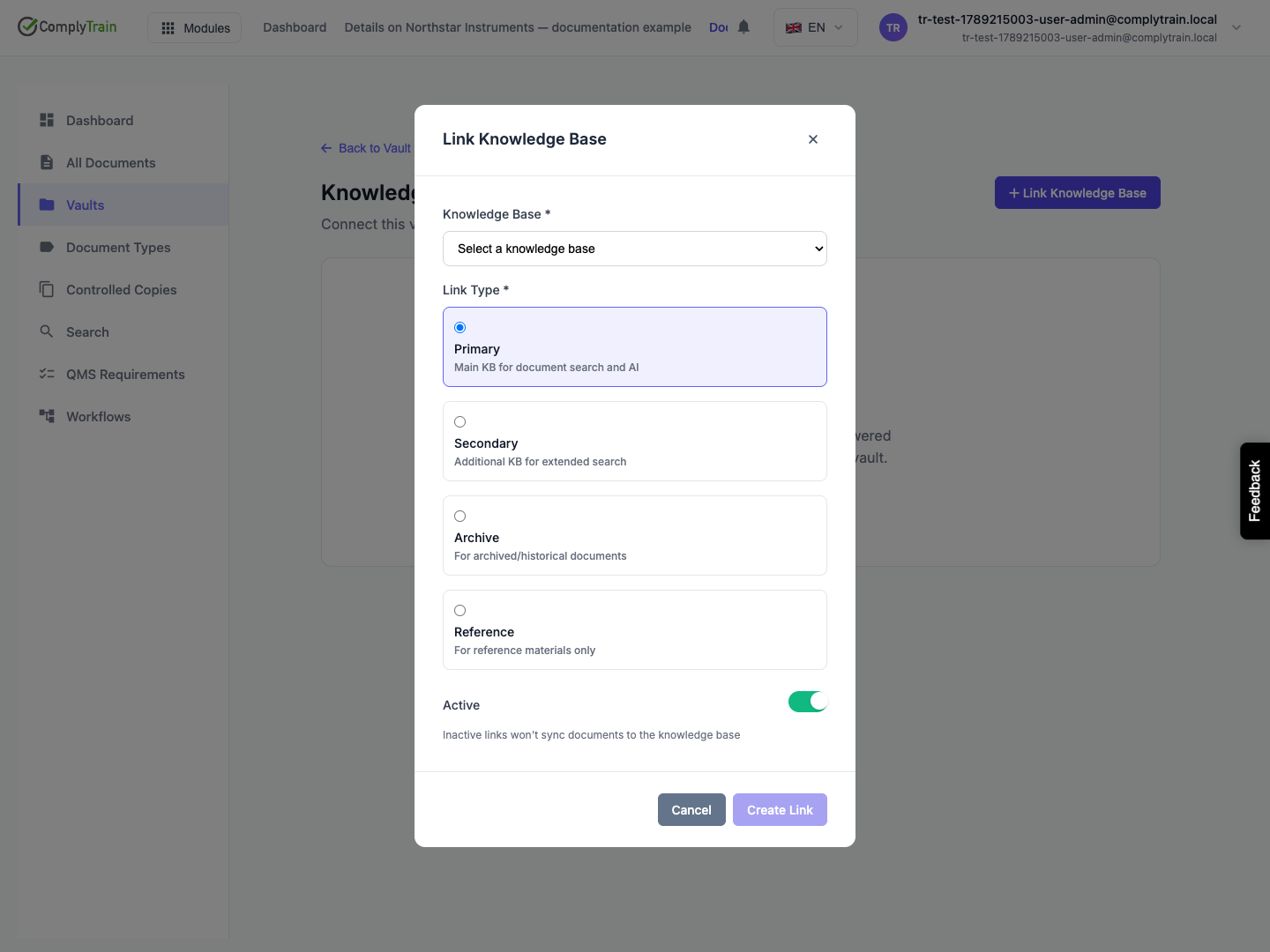
Open the vault and its Knowledge Base Links. Add a link, select an available knowledge base, choose the link type and check whether the link should be active. Save, then inspect the new link in the list.
A knowledge base already linked to this vault is excluded from the new-link picker. Edit its existing link to change its type or active state. Editing a link does not offer a replacement knowledge-base destination.
Link type | Intended use shown in the interface |
|---|---|
Primary | Main knowledge base for document search and AI. |
Secondary | Additional knowledge base for extended search. |
Archive | Archived or historical documents. |
Reference | Reference material. |
The link's purpose and active state are separate from which documents its indexing policy allows.
Configure the indexing policy
Product location: /document-vault/vaults/{vaultId}/kb-links (fallback: /document-vault/vaults)
Choose Configure Indexing Policy on the link. The link card summarises the saved policy.
Option | What to decide |
|---|---|
Indexing scope | Choose All Documents, Approved Only, Published Only or Specific Types, according to the material that should be searchable. With Specific Types, choose the document types to include. |
Index on states | Select the document states that should trigger indexing. The editor lists draft, pending review, approved, published, archived and obsolete. |
Remove on states | Select the states that should remove material from this knowledge base's index. |
Auto reindex | Choose whether document changes should cause reindexing. |
Include metadata | Choose whether document metadata should be included. |
Include content | Choose whether the document's content should be included. |
A new link starts with Approved Only: indexing on approved and published, removal on archived and obsolete, with reindexing, metadata and content included. Choose Save Policy, then reopen the policy to check it.
Verify a useful result
Product location: /document-vault/vaults/{vaultId}/kb-links (fallback: /document-vault/vaults)
For an approved-only use case, choose a document whose approval state you have checked. Confirm its eligibility in the policy, then inspect the knowledge base after indexing has completed. Check a matching search or assistant answer and follow the returned source to the intended document version.
A saved link confirms configuration, not completed ingestion. Missing content can result from the link being inactive, state eligibility, indexing progress or the assistant using a different knowledge base. See knowledge sources for the distinction between source configuration and indexed content.
Pause or remove the connection
Product location: /document-vault/vaults/{vaultId}/kb-links (fallback: /document-vault/vaults)
Deactivate a link when its configured connection should be inactive. Remove Link unlinks the knowledge base from the vault; the confirmation says documents will no longer be indexed to that destination. It does not delete the vault or its documents. Check the knowledge base afterwards to confirm the vault's content has been removed from its index.