Inspect the numbered record, repeated visits and the optional controlled copy awaiting signature.
Product location: /qms/runs/{runId} (fallback: /qms/processes). Select the intended run and step; step selection does not have a separate URL.
Open QMS → Processes, select the process and choose the occurrence in Runs. Check its title and run number, then scroll to Run record.
A completed run produces a separate numbered record, such as PROC-2026-0001. The run number identifies the occurrence; the record number identifies its assembled evidence record. Record numbering is shared across the organisation's process runs, so do not expect a separate record sequence for each process.
Check the record number and Sealed status. The assembled header and content are read-only. This protects the record of completed work from later changes to the process definition or run-step editing.
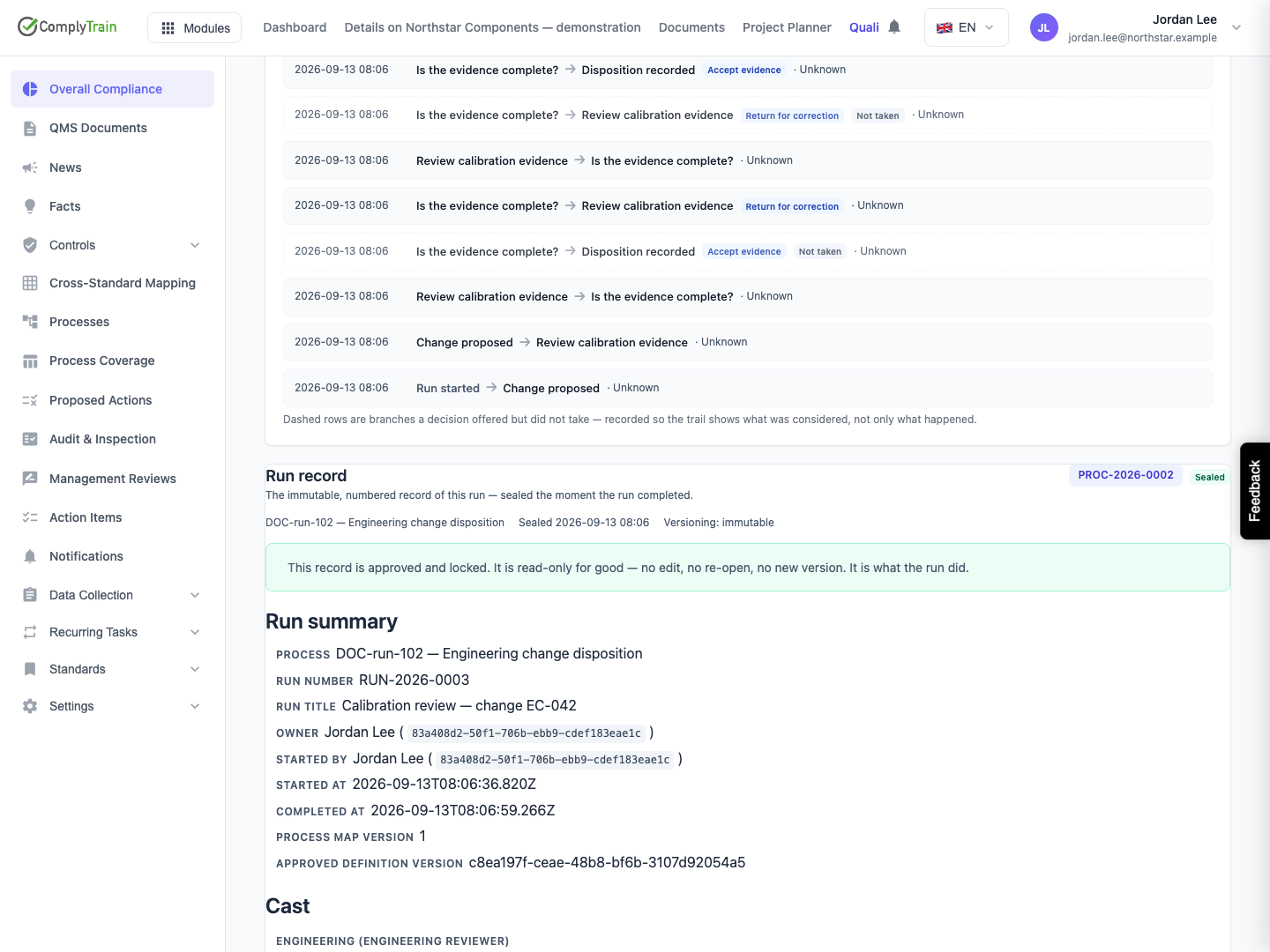
Product location: /qms/runs/{runId} (fallback: /qms/processes). Select the intended run and step; step selection does not have a separate URL.
The record follows the work actually performed. A step revisited for correction contributes another visit section, preserving the earlier pass rather than replacing it. Read the sections in order to understand how the result was reached.
Record detail | How to use it |
|---|---|
Process and run identity | Establish which occurrence and approved process snapshot the record describes. |
Step, lane and visit number | Distinguish the responsibility and each pass through the same step. |
Outcome | Separate completed work from work closed by a skip or other recorded outcome. |
Assignee and person who closed the visit | Identify who held the work and who performed the completion or override. |
Entered, activated and exited times | Establish the sequence and time spent waiting or working. |
Chosen branch and arrival paths | Explain the decision and how the step was reached. |
Completion notes, signatures and evidence | Review the material recorded for this visit. |
An assignee is not necessarily the person who closed a step: a run owner or authorised manager may act. If a displayed name is Unknown, retain the accompanying user identifier and timestamps and ask the administrator to investigate the missing name. Do not replace the recorded identity with an assumption.
The record preserves the evidence associated with the visit. For an external link, also check access to the linked material; recording a URL does not make a separate website available to the reviewer.
Product location: /qms/runs/{runId} (fallback: /qms/processes). Select the intended run and step; step selection does not have a separate URL.
Record generation follows run completion and can finish shortly afterwards. The run's completion state and the record's availability are separate things to check.
What the panel shows | Meaning and next action |
|---|---|
Run has not completed | Continue or review the live run. There is no completed run record yet. |
Cancelled run | Cancellation retained its history, but does not produce a completed-run record. |
Record is being prepared | Allow generation to finish. The panel checks for the result. |
Generation is taking longer, with Check again | Use Check again and preserve the run number if the result remains unavailable. Ask the administrator to investigate. |
Loading error with Retry | Retry loading the existing result; do not create a duplicate run to obtain a record. |
Record number and Sealed | Review the assembled content. |
Avoid starting another occurrence or attempting to complete steps again because the record is still being prepared. Those actions describe new work or conflict with the already completed run.
Product location: /qms/runs/{runId} (fallback: /qms/processes). Select the intended run and step; step selection does not have a separate URL.
The process can require a signed run record through its configuration. When required, the system also prepares a controlled document in the Process Records vault for the document signature workflow.
The signed-copy part of the panel distinguishes being prepared, awaiting signature, signed, and not required. Where a document is available, use the action to open it and follow the document's actual workflow. A generated document awaiting signature is not yet a signed copy. A sealed run record can exist while that separate signature is outstanding.
The optional controlled-copy signature is also separate from a participant typing their name to complete a signature-gated step. Review the relevant status for each requirement rather than treating either action as proof of the other.
Product location: /qms/runs/{runId} (fallback: /qms/processes). Select the intended run and step; step selection does not have a separate URL.
Review evidence and notes before closing a step. The normal run actions do not remove evidence from a closed visit, cancel a completed run or edit the sealed record.
If an error is discovered later, preserve the original record and follow your organisation's correction procedure. Use a new, clearly identified occurrence when the work must be repeated, and explain the relationship to the original run. Do not treat changes to the process workspace as a correction to the historical record.
