Use question filters and reference details, and recognise current loading, category and pagination limitations.
Product location: /qms/{standardCode}/mock-audit (fallback: /qms/standards). Select Question Bank, then Filters. The tab is not encoded in the URL.
Open Quality (QMS) → Standards → your standard → Mock Audit → Question Bank. The bank describes practice questions for that standard. Viewing it requires audit-view access. It is separate from the free-form conversational interview under Audit & Inspection → Mock.
Simply switching to Question Bank does not load questions in this release. Open Filters and change a filter to initiate a request. In the documentation walkthrough, that request failed and the screen displayed No questions found matching your filters. This was a loading failure, not evidence that the standard has no questions.
The client converts failed list requests into an empty result. If you expect questions and see none, check the chosen standard and filters, then ask your administrator to investigate the failed loading request. Repeatedly changing filters cannot repair a service failure. A populated bank and question-detail walkthrough remain unverified for this release.
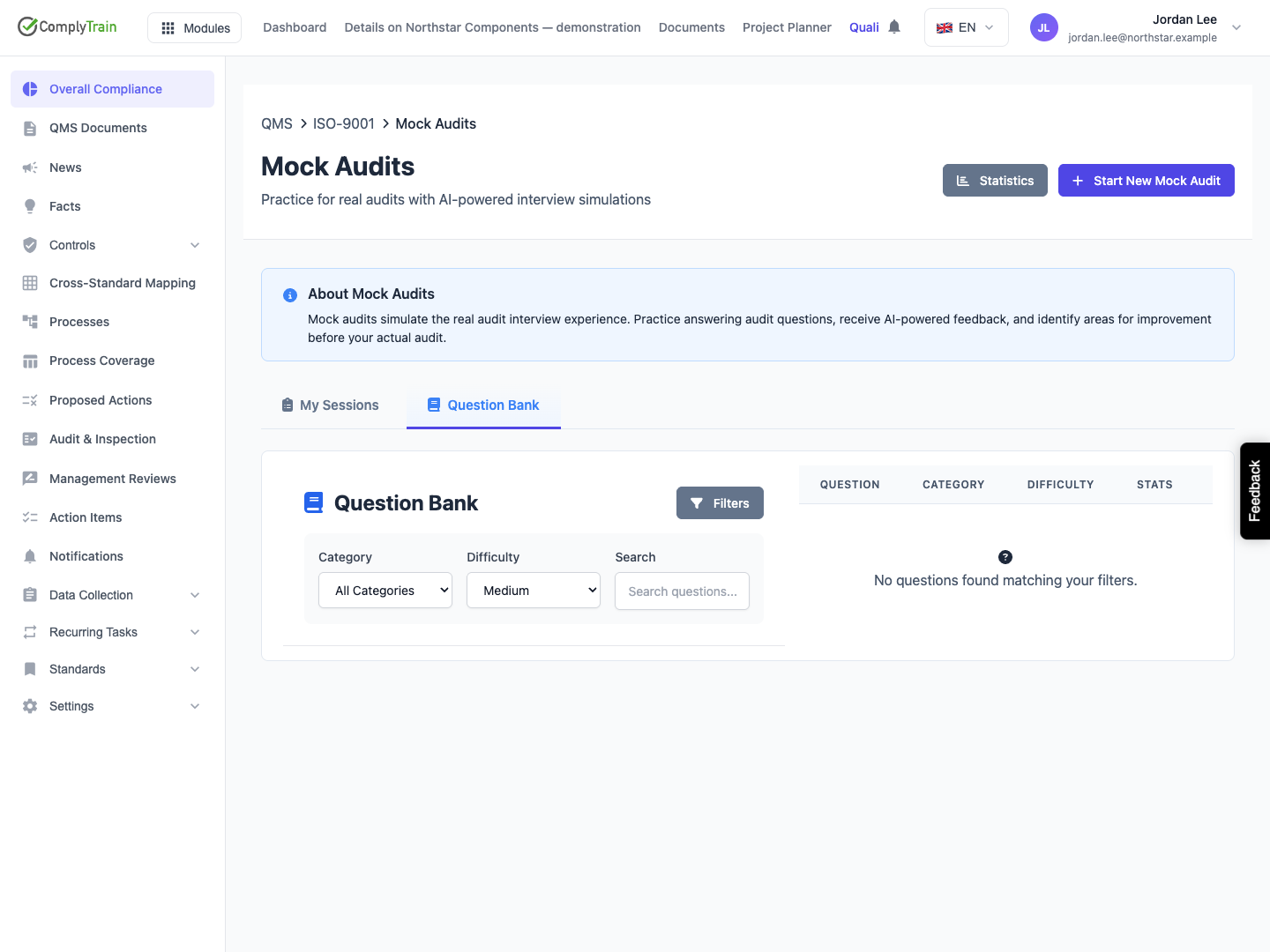
Product location: /qms/{standardCode}/mock-audit (fallback: /qms/standards). Select Question Bank, then Filters. The tab is not encoded in the URL.
Filter | Meaning and released limit |
|---|---|
Category | All Categories initially. The parent page does not load category choices, so there are no specific categories to select here. |
Difficulty | All Levels, Easy, Medium or Hard. Changing it requests the matching questions for the current standard. |
Search | Searches question text without case sensitivity. It does not search model answers, evidence guidance, tags or session responses. Leading and trailing spaces are removed. |
Changes apply immediately. Clear the search and return difficulty to All Levels to remove those restrictions. There is no separate Apply button. The UI does not expose active/inactive, question-type, requirement or process-area filters.
A successful request returns at most 50 questions by default. The footer can show how many were returned out of the total, but there are no next-page controls. Narrow the text or difficulty filter when the total exceeds the displayed rows. The page does not request an active-only filter, so the visible list is not a guarantee that every returned question is active for new practice.
Product location: /qms/{standardCode}/mock-audit (fallback: /qms/standards). Select Question Bank, then Filters. The tab is not encoded in the URL.
When questions load successfully, the table is designed to show:
Column | Interpretation |
|---|---|
Question | First 100 characters, with an ellipsis for longer text. A linked requirement's clause and name can appear underneath. |
Category | Stored category name, or General when there is no name. General is a fallback label, not proof of a deliberately assigned category. |
Difficulty | Easy, Medium or Hard. |
Stats | Recorded Asked and Passed counts. These are usage counters, not the current organisation's certification result. |
Actions | View Details opens the selected row's reference information. |
Use the full question and its context before deciding whether it suits a planned practice session. A high pass count is not proof of good coverage, relevance to your process or independently verified evidence.
Product location: /qms/{standardCode}/mock-audit (fallback: /qms/standards). Select Question Bank, then Filters. The tab is not encoded in the URL.
View Details is designed to open the row's full question, optional code and supporting information. The detail uses the already loaded row; it does not independently refresh the question. Close it using the close control or Escape.
Detail | How to use it |
|---|---|
Type | Open, yes/no, rating or multiple choice. The bank's type does not establish that the current interview UI supports every response type. |
Difficulty and category | Practice classification and grouping. |
Clause and process area | Scope hints, when populated. Confirm the actual applicable requirement and process. |
Source | Manual, AI-generated, imported or requirement-derived provenance. Source labels do not establish human approval. |
Expected Evidence | Guidance about what should substantiate an answer. It does not link or validate actual evidence by itself. |
Model Answer | An example for preparation. Do not copy it as a claim about your organisation unless the statement is accurate and supported. |
Red Flags | Signals to investigate, rather than an automatic nonconformity decision. |
Answer Options | Listed choices where supplied for the question. |
Question Stats | Stored Asked, Passed and Failed counts. Assess the underlying sample before comparing questions. |
The walkthrough could not load these populated details because the question-list operation failed. The field reference above is supported by the released interface and response definition; it is not a claim that a populated detail was exercised.
Product location: /qms/{standardCode}/mock-audit (fallback: /qms/standards). Select Question Bank, then Filters. The tab is not encoded in the URL.
This tenant page has no create, edit, import, deactivate, reorder or delete-question controls. It also has no category-management controls or direct action to add an individual question to a practice session. Arrange question maintenance through the supported administrative process; do not search for an editor on this screen.
The standard-specific mock-audit guide explains the current selection mismatch and unavailable interview operations. Question guidance can help prepare a discussion once it is accessible, but it is not a substitute for recording actual evidence, checking implementation and managing real findings through the audit workflow.
